AI Mobile Coders
AI Fundamentals Every Mobile Developer Should Know in 2026

A few months ago, one of the developers in my community asked me a simple question: “Anand, I build Android apps. Do I really need to understand how AI works, or can I just call an API and move on?”
Honest answer? You can call an API and move on. Plenty of developers do. But here is the problem. When your app gives a weird response, or your API bill suddenly triples, or your feature works in testing but breaks with real users, you will have no idea why. Because you never understood what is actually happening under the hood.
So in this article, I want to break down the core AI concepts every mobile developer should know. No heavy math. No research paper language. Just simple explanations, real examples, and most importantly, how each concept connects to your daily work as a mobile developer.
Let’s start from the very beginning.
1. AI, Machine Learning and Deep Learning
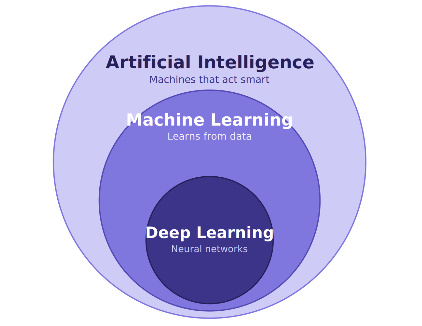
These three terms get mixed up all the time. People use them like they mean the same thing. They do not. Think of them as three circles, one inside the other.
Artificial Intelligence (AI) is the biggest circle. It is any technique that makes a machine behave in a way that seems intelligent. That is it. Even a simple rule-based system counts as AI. For example, an old chess program that says “if opponent moves here, then I move there” is technically AI. There is no learning happening. Someone just wrote a lot of if-else conditions.
Machine Learning (ML) is a circle inside AI. Instead of writing rules by hand, you give the machine lots of data and it figures out the rules on its own.
Here is a simple example. Suppose you want to build a spam filter for an SMS app. The old AI way would be writing rules yourself: “if the message contains the word lottery, mark it as spam.” You would need thousands of rules, and spammers would find new tricks every week.
The ML way is different. You collect 100,000 messages, label each one as spam or not spam, and feed them to an algorithm. The algorithm studies the data and learns the patterns itself. Now when a new message arrives, it can predict whether it is spam, even if that exact message was never in your training data. You never wrote a single rule. The machine learned them.
Deep Learning (DL) is a circle inside ML. It uses something called neural networks, which are loosely inspired by how the human brain works, with layers of connected nodes. The “deep” part just means many layers stacked on top of each other.
Why does deep learning matter? Because traditional ML works well with structured data like numbers and tables, but it struggles with messy data like images, audio and natural language. Deep learning handles this messy data beautifully.
Where you already use this as a mobile developer:
-
Face unlock on Android and iPhone? Deep learning.
-
Google Photos grouping all pictures of your mom automatically? Deep learning.
-
Swiggy predicting your delivery time? Machine learning.
-
Netflix showing you shows you might like? Machine learning.
-
Gboard suggesting the next word while you type? Deep learning.
You have been shipping apps on top of these technologies for years. You just never had to touch them directly. That changed with the next concept.
2. Generative AI
Everything I described above is what we call predictive or discriminative AI. It looks at something and makes a judgement. Is this spam or not? Is this a cat or a dog? Will this user cancel their subscription?
Generative AI is different. It does not just judge. It creates.
Give it a prompt, and it generates something brand new. Text, images, code, audio, video. Things that did not exist before.
A simple way to understand the difference:
-
Predictive AI is like an examiner checking your answer sheet. It looks at existing content and gives a verdict.
-
Generative AI is like a student writing the answer. It produces new content from scratch.
How does it create new things? During training, the model studies massive amounts of data and learns the underlying patterns. Not memorizing, but understanding structure. It learns how sentences flow, how code is written, how a sunset looks in a photo. Then when you ask for something, it uses those learned patterns to generate a fresh output.
Think of it like a chef. A chef who has cooked ten thousand dishes does not memorize every dish. He understands ingredients, flavors and techniques. So when you say “make me something spicy with paneer,” he creates a new dish using everything he has learned. Generative AI works the same way with data.
Real world examples you use daily:
-
ChatGPT and Gemini writing text
-
GitHub Copilot writing code inside Android Studio
-
Midjourney and DALL-E creating images from text descriptions
-
Canva’s Magic Write generating design copy
Mobile developer perspective:
This is where things get exciting for us. Generative AI opened up features that were impossible to build before:
-
A note-taking app that summarizes long meeting notes in one tap
-
A shopping app where users type “show me a blue kurta under 1500 rupees for a wedding” and get exact results
-
A fitness app that generates a personalized weekly diet plan
-
A photo editor that removes background objects (Google’s Magic Eraser is exactly this)
-
A customer support chat inside your app that actually understands the user’s problem
Two years ago, building any of these needed a dedicated ML team. Today, you can build a working prototype over a weekend using the Gemini API. That is why every mobile developer needs to understand this space.
3. Large Language Models (LLMs)
Generative AI is the broad category. LLMs are the specific type of model that powers text-based AI like ChatGPT, Gemini and Claude.
Let’s break the name down word by word:
-
Large: These models are trained on enormous amounts of text. Books, websites, articles, code repositories, documentation. And they have billions of internal settings called parameters. GPT-4 class models are estimated to have hundreds of billions of parameters.
-
Language: They work with human language. They read text and produce text.
-
Model: In ML, a model is simply a program that has learned patterns from data and can make predictions.
So what does an LLM actually do?
Here is the part that surprises most people. At its core, an LLM does one simple thing: it predicts the next word.
That is it. Seriously.
You give it “The capital of India is” and it predicts the most likely next word: “New”. Then it takes the whole sentence including “New” and predicts the next word: “Delhi”. It keeps doing this, one word at a time, until the response is complete.
You might think, how can something so simple write essays, debug my Kotlin code and explain quantum physics? Because when a model becomes really, really good at predicting the next word, it is forced to actually understand grammar, facts, logic and reasoning. You cannot predict the next word in a legal document without understanding law. You cannot predict the next line of code without understanding programming.
It is like Gboard’s next-word suggestion, but a million times more powerful. Gboard suggests one word based on the last two or three words. An LLM considers your entire conversation, everything it learned during training, and picks the next word with far deeper understanding.
Popular LLMs you should know:
-
Gemini (Google): most relevant for Android developers, deeply integrated with Firebase and Android
-
GPT series (OpenAI): powers ChatGPT
-
Claude (Anthropic): known for strong reasoning and long documents
-
Llama (Meta): open source, you can run it on your own servers
Mobile developer perspective:
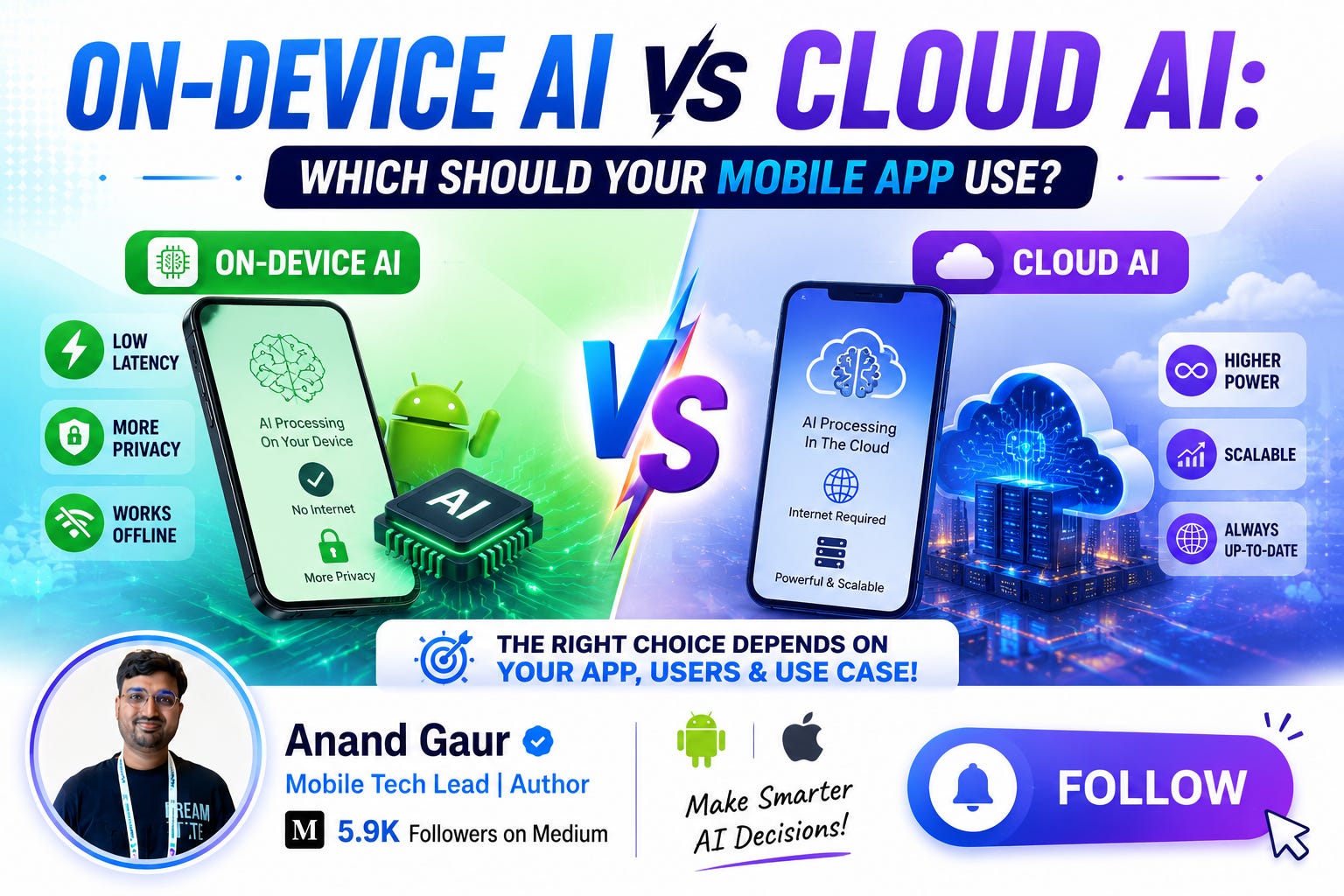
For us, LLMs come in two flavors:
-
Cloud LLMs: Your app sends a request to an API (like the Gemini API) and gets a response. Powerful, but needs internet and costs money per request.
-
On-device LLMs: Smaller models that run directly on the phone. Gemini Nano on Pixel devices is a great example. Free to run, works offline, and user data never leaves the device. The trade-off is that smaller models are less capable.
Choosing between cloud and on-device is going to be one of the key architecture decisions in AI-powered mobile apps, just like choosing between local database and remote API is today.
4. Tokens and Context Window
This is the concept most developers skip, and then get confused by billing and weird model behavior later. Please do not skip this one. It directly affects your app’s cost and performance.
What is a token?
LLMs do not read text word by word or letter by letter. They break text into chunks called tokens. A token can be a full word, part of a word, or even punctuation.
For example, the sentence “I love Android development” might become tokens like: I, love, Android, develop, ment. Notice how “development” got split into two pieces. Common words usually stay as single tokens, while longer or rarer words get split.
A rough rule of thumb for English: 1 token is about 4 characters, or roughly 75 words is about 100 tokens.
Why do models use tokens instead of words? Because tokens are efficient. A model with a fixed vocabulary of, say, 100,000 tokens can represent any text in any language, including words it has never seen, by combining smaller pieces. It is similar to how every color on your screen is made from combinations of just red, green and blue.
Why tokens matter to you as a developer:
-
You pay per token. Every LLM API charges based on tokens, both input (what you send) and output (what the model generates). If your app sends the entire chat history with every message, your token count grows with every turn, and so does your bill. I have seen developers get shocked by their first API invoice because of this.
-
Response speed depends on tokens. The model generates output one token at a time. A 1000-token response takes noticeably longer than a 100-token response. In a mobile app, where users expect instant feedback, asking the model to “keep it short” is a genuine performance optimization.
What is a context window?
The context window is the total amount of tokens the model can handle in a single request. This includes your instructions, the conversation history, any documents you attach, and the model’s response. All of it together must fit inside the window.
Think of it as the model’s working memory, like RAM in a phone. Everything the model can “see” right now must fit in this space. Anything outside it simply does not exist for the model.
This explains something you may have noticed while using ChatGPT. In a very long conversation, the model starts forgetting things you said earlier. That is not a bug. The older messages have fallen outside the context window, so the model literally cannot see them anymore.
Modern models have large windows. Gemini supports up to 1 million tokens, which is enough to fit several full-length books in a single request. But large context also means large cost, so bigger is not always better for your use case.
Mobile developer perspective:
Say you are building a chat assistant inside your app. Every time the user sends a message, you send the conversation history so the model remembers the context. As chats get longer, you have real decisions to make:
-
Do you send the full history every time? Accurate, but expensive and slow.
-
Do you send only the last 10 messages? Cheap and fast, but the model forgets older context.
-
Do you summarize old messages and send the summary plus recent messages? A smart middle path many production apps use.
This is a real architecture decision, exactly like deciding your caching strategy or pagination approach. Understanding tokens is what lets you make it well.
5. Prompt Engineering (Prompts and Responses)
A prompt is the input you send to the model. The response is what it sends back. Prompt engineering is the skill of writing prompts that reliably get you the output you want.
Some people laugh at the term. “Writing text is engineering now?” But once you build an actual AI feature, you realize this is a serious skill. The same model can give you garbage or gold depending on how you ask.
A simple demonstration.
Weak prompt:
“Tell me about this error.”
Strong prompt:
“You are an Android expert. I am getting a NetworkOnMainThreadException in my Kotlin app when calling an API. Explain why this happens in 2 or 3 sentences, then show the fix using Kotlin coroutines. Only show the corrected code, no extra commentary.”
The second prompt gives the model a role, the exact context, the desired format, and the constraints. The response will be ten times more useful.
Core prompting techniques you should know:
1. Role assignment. Start by telling the model who it should be. “You are a senior Android developer reviewing code.” This shapes the tone, depth and vocabulary of the response.
2. Be specific about the output format. If you want JSON, say so and show the exact structure. If you want three bullet points, say three bullet points. Models follow format instructions surprisingly well.
3. Few-shot prompting. Give examples of input and expected output before asking your real question. If you want the model to classify user feedback as “bug”, “feature request” or “praise”, show it two or three labelled examples first. Accuracy jumps dramatically.
4. Chain of thought. For complex problems, ask the model to think step by step before giving the final answer. It genuinely improves reasoning quality.
5. Set boundaries. Tell the model what NOT to do. “If you are not sure, say you do not know instead of guessing.” This one line reduces made-up answers significantly.
Mobile developer perspective, and this is important:
When you build an AI feature in your app, the user’s message is not the full prompt. You wrap it inside a system prompt that you write and control.
Suppose you build a recipe app with an AI cooking assistant. The user types “something quick with paneer”. But what your app actually sends is something like:
System: You are a cooking assistant inside the FoodieApp. Only answer cooking-related questions. Always respond in under 150 words. Return the answer as JSON with fields: recipeName, ingredients, steps, cookingTime. If the question is not about food, politely decline.
User: something quick with paneer
That system prompt IS your product. It defines your feature’s behavior, safety, and output format. A weak system prompt means an assistant that goes off-topic, returns unparseable output, and crashes your JSON parsing logic. In AI-powered apps, prompts are as much a part of your codebase as your Kotlin files. Version them, test them, and review them like code.
6. Key Model Parameters
When you call an LLM API, you do not just send a prompt. You also send settings that control how the model behaves. These are model parameters, and they are basically the knobs and dials on the machine.
Let me explain the ones that actually matter in daily work.
Temperature
This is the most important one. Temperature controls randomness and creativity, usually on a scale from 0 to 1 (some APIs allow up to 2).
Remember how the model predicts the next token? At every step, it actually has a list of candidate tokens with probabilities. Temperature decides how it picks from that list.
-
Low temperature (0 to 0.3): The model almost always picks the highest probability token. Output becomes focused, consistent and predictable. Ask the same question twice, you get nearly the same answer.
-
High temperature (0.7 to 1): The model takes more chances on less likely tokens. Output becomes creative and varied, but also less reliable.
Think of it like ordering food. Temperature 0 is ordering your usual dal makhani every single time. Temperature 1 is telling the waiter “surprise me”. Sometimes you discover something amazing, sometimes you regret it.
When to use what in your app:
-
Extracting structured data from text, generating JSON, answering factual questions, code generation: keep temperature low, around 0 to 0.2. You want reliability.
-
Writing captions, story generation, brainstorming features, marketing copy: go higher, 0.7 to 0.9. You want variety.
Max output tokens
A hard limit on response length. If you set it to 200, the model stops at 200 tokens even mid-sentence. Use this to control costs and keep responses snappy in your app. For a push notification generator, you might cap it at 50 tokens. For a document summarizer, maybe 500.
Top-p (nucleus sampling)
Another way to control randomness. Instead of adjusting probabilities like temperature, top-p limits the pool of tokens the model can choose from. Top-p of 0.9 means “only consider the smallest set of tokens whose combined probability is 90 percent.” In practice, most developers tune either temperature or top-p, not both. Standard advice: adjust one, leave the other at default.
Top-k
Similar idea, but simpler. Top-k of 40 means “only consider the 40 most likely tokens at each step.” You will see this in the Gemini API.
Stop sequences
Tell the model to stop generating when it produces a specific string. Useful when you want output in a strict format and nothing after it.
Mobile developer perspective:
Here is a real scenario. You build a feature where the model returns product details as JSON, and your app parses that JSON to render the UI. In testing everything works. In production, one out of every fifty responses breaks your parser because the model added a friendly sentence before the JSON.
The fix is usually not more code. It is setting temperature to 0, adding a clear format instruction in the system prompt, and using a stop sequence. Parameters are debugging tools. Learn them before you need them at 2 AM.
7. Multimodal AI
Everything so far has been about text in, text out. Multimodal AI removes that limit. “Modal” refers to a mode of input, like text, image, audio or video. A multimodal model can understand and combine multiple modes.
So with a model like Gemini, you can:
-
Send a photo and ask “what dish is this and how do I make it?”
-
Send a screenshot of a crash log and ask “what is causing this?”
-
Send an audio clip and ask for a summary
-
Send a video and ask “at what point does the speaker mention pricing?”
Why is this a big deal?
Because humans are multimodal. When your friend shows you a photo and asks “should I buy this shirt?”, you process the image and the question together. Old AI systems needed a separate model for each type of input, and gluing them together was painful. Modern multimodal models handle all of it natively, in one API call.
Real world examples:
-
Google Lens: point your camera at anything and ask questions about it
-
Gemini Live: have a voice conversation while showing your camera feed
-
ChatGPT voice mode: talk to it like a phone call
-
Circle to Search on Android: circle anything on screen and search it
Mobile developer perspective:
I would argue multimodal AI matters MORE for mobile than for any other platform. Think about what a phone is. It has a camera, a microphone, a GPS, sensors. A phone is a multimodal input device sitting in everyone’s pocket. Desktop users type. Mobile users point, speak and show.
Some features this unlocks:
-
Expense tracker: user photographs a restaurant bill, your app extracts amount, date and items automatically. No manual entry.
-
Plant care app: user photographs a dying plant, the app diagnoses the problem and suggests treatment.
-
Language learning app: user speaks a sentence, the app checks pronunciation and corrects grammar.
-
Fitness app: user records a short video of their squat, the app points out form mistakes.
-
E-commerce: user photographs a dress they saw somewhere, your app finds similar products in your catalog.
Every one of these was a moonshot feature five years ago. Today each one is a single multimodal API call. If you are brainstorming AI features for a mobile app, always start from the phone’s superpowers: camera and mic.
8. Retrieval Augmented Generation (RAG)
Now let me cover a concept that becomes important the moment you try to build a serious AI feature. RAG.
First, understand the problem. LLMs have two big limitations:
-
They only know their training data. A model trained till mid-2025 has no idea what happened after that. And more importantly, it knows nothing about YOUR private data. Your app’s FAQ, your product catalog, your user’s notes, your company’s policy documents. None of it.
-
They confidently make things up. When a model does not know something, it often does not say “I don’t know”. It generates a fluent, confident, completely wrong answer. This is called hallucination, and it is the number one reason AI features lose user trust.
So what do you do when you want the model to answer questions about YOUR data, accurately?
One option is training your own model on your data. Extremely expensive, needs ML expertise, and you have to redo it every time your data changes. Not practical for most teams.
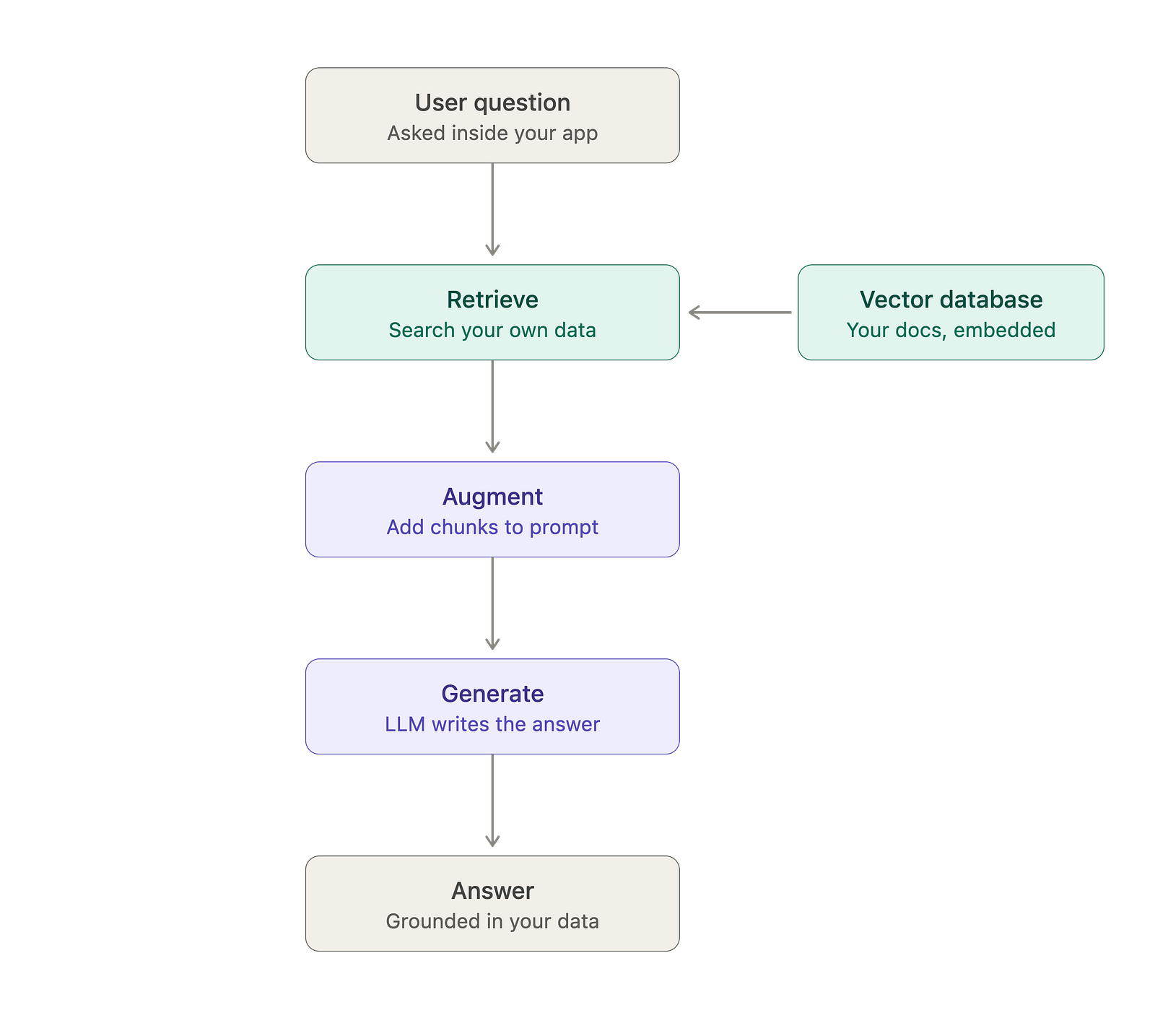
The practical answer is RAG: Retrieval Augmented Generation.
What is RAG?
The idea is beautifully simple. Instead of expecting the model to know everything, you fetch the relevant information first and hand it to the model along with the question.
Break the name down:
-
Retrieval: search your own data and pull out the pieces relevant to the user’s question
-
Augmented: add those pieces into the prompt
-
Generation: the model generates the answer using that provided information
My favorite analogy: a normal LLM call is a closed-book exam. The model answers purely from memory, and memory can fail. RAG is an open-book exam. You slide the right page of the book in front of the model and say “answer using this.” Accuracy shoots up instantly.
How it works, step by step:
Suppose you build a banking app with an AI help assistant. A user asks: “What is the charge for an international transaction?”
-
Your system searches your bank’s policy documents and finds the section about international transaction fees.
-
You build a prompt like: “Answer the user’s question using ONLY the information below. If the answer is not in the information, say you don’t know. Information: [that policy section]. Question: What is the charge for an international transaction?”
-
The model reads the provided text and answers accurately, with the real fee from your real document.
No retraining. No hallucinated fee amounts. And when the bank updates the policy next month, you just update the document. The AI is instantly up to date.
One more piece: how does the “search” part work?
This is where embeddings come in. An embedding converts text into a list of numbers that captures its meaning. Texts with similar meaning get similar numbers. So “international transaction fee” and “charges for overseas payments” end up close to each other numerically, even though they share almost no words.
You convert all your documents into embeddings once and store them in a vector database. When a question comes in, you convert the question into an embedding too, and find the stored chunks closest to it. That is semantic search, and it is far smarter than keyword matching.
Real world examples:
-
Customer support bots that answer from a company’s actual help articles
-
“Chat with your PDF” apps
-
Notion AI answering questions from your own workspace
-
Code assistants that answer using your team’s actual codebase
Mobile developer perspective:
RAG is everywhere in mobile AI features, even when nobody calls it RAG:
-
In-app support assistant: instead of a rigid FAQ list, users ask in natural language and get answers from your actual help content. This alone can cut your support tickets significantly.
-
Notes or documents app: “What did I write about the Goa trip budget?” The app retrieves the right notes and answers. This is search reinvented.
-
E-commerce app: “Do you have running shoes with good arch support under 3000?” Retrieval happens over your live product catalog, so answers are always current and never hallucinated products.
-
Health or fitness app: answers grounded in your app’s verified content instead of whatever the model imagines, which matters a lot for sensitive domains.
Architecture-wise, you have the same cloud versus on-device choice again. The common setup is cloud: your backend holds the vector database, does retrieval, calls the LLM, and returns the answer to the app. But on-device RAG is becoming real too. You can generate embeddings on device, store them in a local vector store, and pair retrieval with an on-device model. Result: the user’s personal data never leaves the phone, and the feature works offline. For privacy-sensitive apps, this combination is gold.
One practical tip from experience: the quality of a RAG feature depends more on retrieval than on the model. If you fetch the wrong chunks, even the best model gives wrong answers. Garbage in, garbage out. Spend your effort on chunking your documents well and testing retrieval quality. That is where real RAG engineering happens.
9. Why AI Matters for Mobile Development
Let me tie everything together and answer the question from the beginning. Why should a mobile developer care about all this?
1. User expectations have already shifted.
Users talk to ChatGPT and Gemini daily. They have stopped thinking in terms of filters and dropdowns. They expect to type “show me trips under 20k for a long weekend” and get results. Apps with rigid, form-based interactions are starting to feel old. This shift is happening whether we participate or not.
2. The barrier to entry has collapsed.
Earlier, adding intelligence to an app meant hiring ML engineers, collecting training data, and months of work. Today the intelligence is available behind an API. Your job is integration, prompt design, UX and architecture. All skills a mobile developer already has or can quickly build. The hard part became accessible. That is a rare kind of opportunity.
3. On-device AI is becoming an Android platform feature.
Google is pushing hard on this. Gemini Nano runs directly on device through AICore. ML Kit gives you ready-made vision and language APIs. Android now ships GenAI APIs for summarization, proofreading and image description that work offline. Knowing this stack is becoming as fundamental as knowing Room or Retrofit. On-device AI also solves the three classic mobile problems at once: it works offline, it costs nothing per request, and user data never leaves the phone.
4. New engineering problems, and they are OUR problems.
AI features raise questions that only mobile developers can answer:
-
How do you show a streaming LLM response smoothly in a Compose UI?
-
How do you handle a 5-second model response on a flaky 3G connection?
-
How do you cache AI responses to save cost and battery?
-
When do you use on-device inference versus cloud API?
-
How do you design fallback UX when the model fails or gives a bad answer?
These are not data science problems. They are mobile engineering problems. Someone will solve them in every team. Better if that someone is you.
5. Career reality.
Job postings for Android and iOS roles increasingly mention Gemini API, ML Kit, or “experience integrating LLM features.” Interviewers have started asking system design questions like “design an AI chat feature for our app.” The developers who understand tokens, context windows, prompt design and on-device trade-offs will stand out sharply from those who have only ever called REST APIs.
The mindset shift
Here is how I think about it. In 2010, “mobile developer” meant knowing Java and the Android SDK. Then we all learned Kotlin. Then declarative UI with Compose. Each shift felt big at the time, and each one became just… part of the job.
AI is the next layer. Not a replacement for mobile development, but an addition to it. The apps of the next five years will be built by developers who can combine solid mobile fundamentals with AI capabilities. Neither skill alone is enough. Both together are powerful.
You do not need to become an ML researcher. You need to understand the concepts in this article well enough to design, build and debug AI features confidently. And if you read this far, you already do.
Summary
-
AI is the big umbrella, ML learns from data instead of rules, Deep Learning uses neural networks for complex data like images and language.
-
Generative AI creates new content instead of just classifying existing content.
-
LLMs are giant next-word predictors that became so good at prediction, they learned to reason.
-
Tokens are the units models read and you pay for. The context window is the model’s working memory.
-
Prompt engineering is how you control model behavior. In your app, the system prompt is part of your product.
-
Parameters like temperature are your knobs for reliability versus creativity. Low for JSON and facts, high for creative output.
-
Multimodal AI understands images, audio and video, and it fits mobile perfectly because phones have cameras and mics.
-
AI matters for mobile because user expectations have shifted, the barrier has collapsed, and the engineering problems it creates are mobile problems.
If this article helped you understand these concepts, share it with a developer friend who keeps hearing these terms but never got a clear explanation.
Happy coding!
I write about Android development, AI for mobile developers, and mobile system design. Follow me here on Medium for more articles like this.
Level Up Your Mobile Developer Interview !
Cracking the Mobile System Design Interview Book
Your complete practical guide to mastering Mobile System Design Interviews — covering scalable architecture, Android & iOS system design concepts, high-level design strategies, low-level design patterns, performance optimization, offline-first architecture, real-world case.
👉 Grab your copy now:
https://medium.com/@anandgaur2207/cracking-the-mobile-system-design-interview-book-8ff043db0359
iOS Developer Interview Handbook
From Swift fundamentals to advanced iOS concepts — a complete handbook to help you prepare smartly and confidently.
👉 Explore the book:
https://medium.com/@anandgaur2207/crack-ios-developer-interviews-with-confidence-the-complete-ios-developer-handbook-f1eabc3d7a21
Mastering AI for Android Developers
Your complete hands-on guide to integrating AI into Android apps — covering Generative AI, LLMs, on-device intelligence, AI APIs, real-world use cases, and practical implementation with modern Android development.
👉 Grab your copy now:
https://medium.com/@anandgaur2207/mastering-ai-for-android-developers-5cc6d62e7d21
Crack Android Interviews Like a Pro
Your complete Android interview preparation book — packed with real questions, deep explanations, and practical insights to help you stand out.
👉 Grab your copy now:
https://medium.com/@anandgaur2207/crack-android-interviews-with-confidence-the-only-handbook-youll-need-b87ec525f19c
Flutter Developer Interview Handbook
Ace your next Flutter interview with scenario-based questions, detailed explanations, and hands-on examples that make you stand out.
👉 Explore the book:
https://medium.com/@anandgaur2207/crack-flutter-developer-interviews-with-confidence-the-complete-flutter-developer-interview-6cb53996832c
React Native Developer Interview Handbook
Crack your next React Native interview with confidence!
This guide is packed with scenario-based questions, detailed explanations, and hands-on examples to help you stand out and succeed.
👉 Explore the book:
https://medium.com/@anandgaur2207/react-native-interview-crack-your-next-interview-with-confidence-0d7255a20fe1
Need 1:1 Career Guidance or Mentorship?
If you’re looking for personalized guidance, interview preparation help, or just want to talk about your career path in mobile development — you can book a 1:1 session with me on Topmate.
I’ve helped many developers grow in their careers, switch jobs, and gain clarity with focused mentorship. Looking forward to helping you too!
Found this helpful? Don’t forgot to clap 👏 and follow me for more such useful articles about Android development and Kotlin or buy us a coffee here ☕
If you need any help related to Mobile app development. I’m always happy to help you.
Follow me on: