AI Mobile Coders
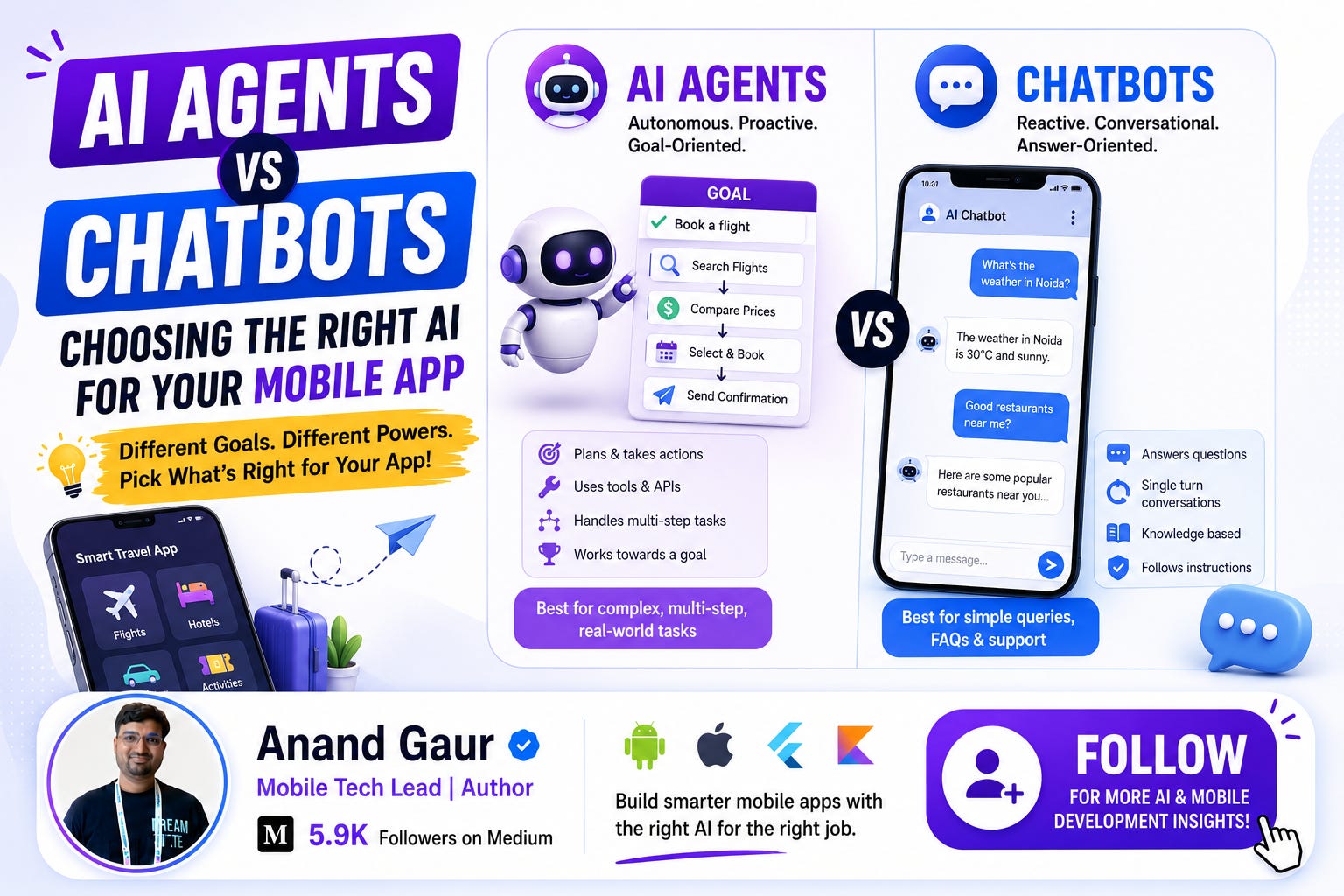
AI Agents vs Chatbots: Choosing the Right AI for Your Mobile App

Every mobile developer I meet these days asks me the same question in different words:
“Anand, should I add a chatbot to my app, or should I build an AI agent?”
And honestly, most of them cannot clearly explain the difference between the two. That is not their fault. The internet has made these two terms so confusing that people use them interchangeably. Some even think an AI agent is just a fancy name for a chatbot.
By the end of this blog, you will know exactly what a chatbot is, what an AI agent is, how both work internally, when to use which one in your mobile app, what it costs you in terms of latency, money, and complexity, and how real companies are using both today.
Grab a cup of chai. This is going to be a long but easy ride.
Let Us Start With a Simple Story
Imagine you walk into a bank.
At the reception, there is a person whose only job is to answer your questions. You ask, “What is the home loan interest rate?” and they tell you, “8.5 percent.” You ask, “What documents do I need?” and they hand you a list. That is it. They answer. They do not act.
Now imagine a different person. A personal relationship manager. You tell them, “I want a home loan of 50 lakhs.” This person does not just answer. They check your credit score, compare three loan options, fill out the application form for you, book an appointment with the branch manager, and message you when everything is done.
The receptionist is a chatbot.
The relationship manager is an AI agent.
Both talk to you. But one only responds, and the other one acts. Keep this story in your head, because everything else in this blog is just a technical expansion of this one idea.
Part 1: What Is a Chatbot, Really?
A chatbot is a software program designed to have a conversation. Input comes in as text or voice, and output goes back as text or voice. That is the complete job description.
Chatbots have existed for decades, and they have evolved in three generations. Understanding these generations will make you a much smarter developer, because many apps still use the older generations, and sometimes that is the right choice.
Generation 1: Rule-Based Chatbots
These are the simplest. They work on if-else logic.
IF user says “hi” or “hello”
    THEN reply “Hello! How can I help you?”

IF user message contains “refund”
    THEN reply “Refunds take 5 to 7 business days.”
You have definitely used these. The bank apps where you press 1 for balance and 2 for card block are basically rule-based bots. They are cheap, fast, predictable, and completely dumb. If a user types “mera paisa kab aayega,” the bot has no idea this means refund, because “refund” keyword is missing.
When rule-based bots still make sense: FAQ sections, guided flows like onboarding, and situations where you legally cannot allow the bot to say anything creative, like medical or banking disclaimers.
Generation 2: NLU-Based Chatbots (Intent and Entity)
The second generation added a brain called Natural Language Understanding. Tools like Google Dialogflow, Rasa, and Amazon Lex belong here.
Here the bot does not match keywords. It tries to detect the intent behind a message and extract entities from it.
User says: “Book a cab to the airport tomorrow at 6 am”
The NLU engine breaks it down like this:
Intent:   book_cab
Entities: destination = airport
          date = tomorrow
          time = 6 am
Now your backend code takes this structured data and calls the cab booking API. This was a huge improvement. The user could speak naturally, in different phrasings, and the bot could still understand.
But there was a catch. You had to define every intent in advance. If your bot supported 40 intents and the user asked something that was the 41st thing, the bot fell flat on its face with “Sorry, I did not understand that.” We have all felt that frustration.
Generation 3: LLM-Based Chatbots
Then came ChatGPT in late 2022, and everything changed.
LLM stands for Large Language Model. Models like GPT, Gemini, Claude, and Llama are trained on massive amounts of text, and they can understand and generate human-like language without you defining any intents.
Now the conversation flow becomes beautifully simple:
User message --> LLM --> ResponseYou do not write rules. You do not define intents. You just send the user message to the model along with a system prompt like “You are a helpful support assistant for a food delivery app,” and the model handles the rest.
An LLM-based chatbot can handle the 41st question, the 100th question, and even questions in Hinglish. This is what most people mean today when they say “chatbot.”
The One Line Definition of a Chatbot
A chatbot takes your message, understands it, and gives you a response. The conversation is the product. Nothing happens outside the conversation.
Remember this line. It is the key to understanding the difference coming up next.
Part 2: What Is an AI Agent?
Now here is where things get exciting.
An AI agent also uses an LLM as its brain. But instead of just replying to you, the agent can take actions in the real world to complete a goal.
The formal definition sounds like this:
An AI agent is a system that uses an LLM to reason about a goal, break it into steps, use tools to execute those steps, observe the results, and keep going until the goal is achieved.
Too heavy? Let me simplify with our bank story.
You tell the agent: “Find me the cheapest flight from Delhi to Bangalore next Friday and book it.”
A chatbot would reply: “You can check flights on the search page.”
An agent would actually do this:
Step 1: Think    -> “I need to search flights first”
Step 2: Act      -> Calls the flight search API with Delhi, Bangalore, next Friday
Step 3: Observe  -> Gets back 23 flights with prices
Step 4: Think    -> “IndiGo 6E-204 at 7 am is cheapest at 4,200 rupees”
Step 5: Act      -> Calls the booking API with that flight
Step 6: Observe  -> Booking confirmed, PNR received
Step 7: Respond  -> “Done! Booked IndiGo 6E-204 for Friday 7 am. Your PNR is XYZ123.”
See the difference? The agent has a loop. Think, act, observe, repeat. This loop is the heart of every AI agent, and it even has a famous name in the AI world: the ReAct pattern, short for Reasoning and Acting.
The Four Building Blocks of an Agent
Every AI agent, whether built by a startup or by Google, has these four components. Learn these four words and you can hold your own in any AI architecture discussion.
1. The Brain (LLM)
The LLM does the thinking. It reads the goal, decides what to do next, and interprets results. GPT-4, Gemini, and Claude are the popular brains today.
2. Tools (The Hands)
Tools are functions the agent can call. A tool can be anything: a REST API, a database query, a calculator, a web search, or even another agent. In your mobile app context, a tool could be “getOrderStatus(orderId)” or “cancelSubscription(userId).”
This capability is officially called function calling or tool calling, and all major LLM providers support it. You describe your functions to the model in a structured format, and the model tells you which function to call with which arguments. Your code executes it and sends the result back.
3. Memory
Agents need to remember things. There are two kinds:
-
Short-term memory: the current conversation and the steps taken so far. This lives in the context window of the LLM.
-
Long-term memory: things that should survive across sessions, like “this user prefers window seats.” This is usually stored in a database, often a vector database, and fetched when relevant.
4. Planning
For complex goals, the agent first breaks the goal into smaller steps, like a project manager making a task list. Simple agents skip explicit planning and just decide one step at a time inside the loop. Advanced agents create a full plan, execute it, and even revise the plan when something fails.
The Agent Loop in Pseudocode
If you are a developer, this ten-line pseudocode will explain agents better than any thousand-word essay:
goal = user_message

while not goal_completed:
    thought = llm.think(goal, history)
    if thought.needs_tool:
        result = execute_tool(thought.tool_name, thought.arguments)
        history.add(result)
    else:
        return thought.final_answer
That is literally it. Every fancy agent framework like LangChain, LangGraph, CrewAI, or Google’s Agent Development Kit is a sophisticated wrapper around this loop, with better error handling, memory management, and multi-agent coordination.
Part 3: Chatbot vs Agent, The Real Differences
Now that you know both, let us put them side by side. This table is the summary of everything so far.
Aspect Chatbot AI Agent Core job Respond to messages Complete goals Can take actions? No, only talks Yes, calls APIs and tools Working style One question, one answer Multi-step loop until done Autonomy Zero, waits for user High, decides its own next steps Memory Usually just the chat history Short-term plus long-term memory Complexity to build Low to medium Medium to very high Cost per interaction Low, one LLM call Higher, multiple LLM calls per task Latency Fast, 1 to 3 seconds Slower, can take 10 seconds to minutes Predictability High Lower, needs guardrails Example “Your order will arrive by 7 pm” Actually reschedules your delivery to 7 pm
One more way to remember it:
A chatbot answers “What is the status of my refund?” An agent handles “Get my refund processed.”
The first is information. The second is outcome.
A Common Confusion: Is ChatGPT a Chatbot or an Agent?
Great question, and the answer will sharpen your understanding.
Plain ChatGPT, where you type and it replies, is a chatbot. But the moment it starts browsing the web, running code, or booking things through plugins and operator-style features, it is behaving as an agent. The same underlying model can power both. The difference is not the model. The difference is the architecture around the model. Tools plus loop plus autonomy equals agent.
Part 4: The Mobile Developer’s Perspective
Everything above was general theory. Now let us talk about what actually matters to you and me as mobile developers. Because building AI into a mobile app is very different from building it into a web dashboard.
Where Does the AI Actually Run?
You have three choices, and this decision affects everything else.
Option 1: Cloud-based AI
Your app sends the user message to your backend, the backend calls the LLM API (OpenAI, Gemini, Claude), and the response comes back.
-
Pros: Most powerful models, easy to update, no device load
-
Cons: Needs internet, per-request cost, latency, user data leaves the device
Option 2: On-device AI
The model runs on the phone itself. Google’s Gemini Nano runs on-device on supported Android phones through AICore and the ML Kit GenAI APIs. Apple offers its Foundation Models framework so iOS apps can use Apple Intelligence models on-device.
-
Pros: Works offline, zero API cost, privacy-friendly, low latency
-
Cons: Smaller models, less capable, only newer devices supported
Option 3: Hybrid
Use on-device for simple, quick tasks like summarizing a notification, and fall back to cloud for heavy reasoning. This is where the industry is heading, and honestly, this is what I recommend for serious apps in 2026.
Critical Rule: Never Put Your API Key in the App
I have to say this loudly because I still see developers doing it. Never call the OpenAI or Gemini API directly from your Android or iOS app with the API key inside the app. Anyone can decompile your APK and steal the key, and you will wake up to a bill of thousands of dollars.
Always route through your own backend:
Mobile App --> Your Backend --> LLM APIYour backend adds authentication, rate limiting, logging, and cost control. For quick prototypes, Firebase AI Logic gives you a secure way to call Gemini from mobile without managing your own server.
Chatbot in a Mobile App: What It Looks Like
Let us say you are building a food delivery app and want a support chatbot. The architecture is refreshingly simple:
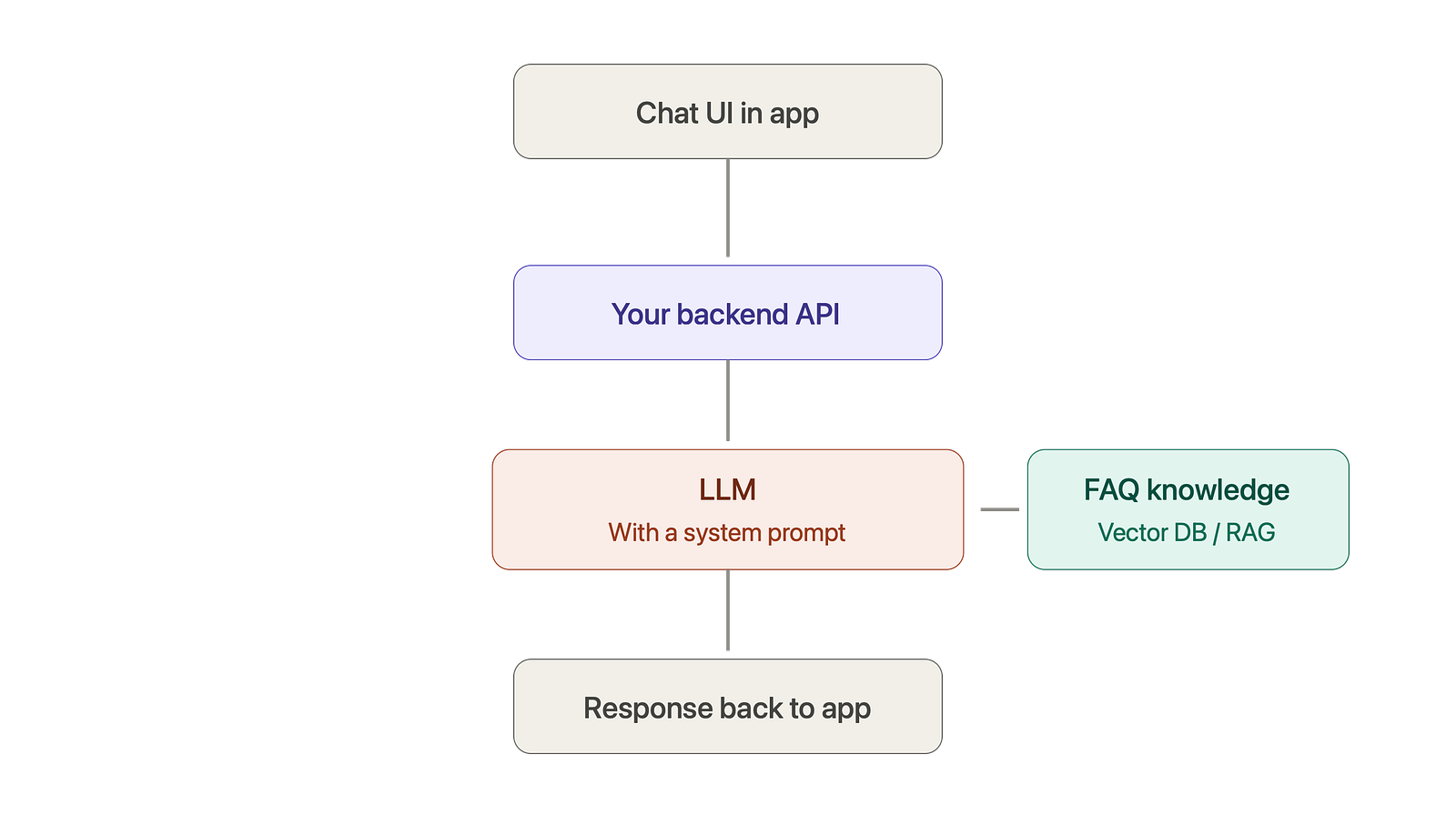
A simplified Android example of the flow in Kotlin:
// ViewModel
fun sendMessage(userText: String) {
    viewModelScope.launch {
        _messages.value += ChatMessage(userText, isUser = true)
        _isTyping.value = true

val reply = chatRepository.getReply(
            message = userText,
            history = _messages.value.takeLast(10)
        )
        _isTyping.value = false
        _messages.value += ChatMessage(reply, isUser = false)
    }
}
Notice that we send the last 10 messages as history. LLMs are stateless. They remember nothing between calls. Your app or backend has to send the conversation history every time. This is a detail many beginners miss, and then they wonder why the bot forgot the user’s name from two messages ago.
To make the chatbot answer questions about your app specifically, you use RAG (Retrieval Augmented Generation). In simple words: store your FAQs and policies in a vector database, and when a user asks something, fetch the most relevant pieces and paste them into the prompt. Now the bot answers from your data instead of its general knowledge, and hallucinations drop dramatically.
AI Agent in a Mobile App: What It Looks Like
Now suppose you want to upgrade from “answers refund questions” to “actually processes refunds.” Welcome to agent territory. The architecture grows:
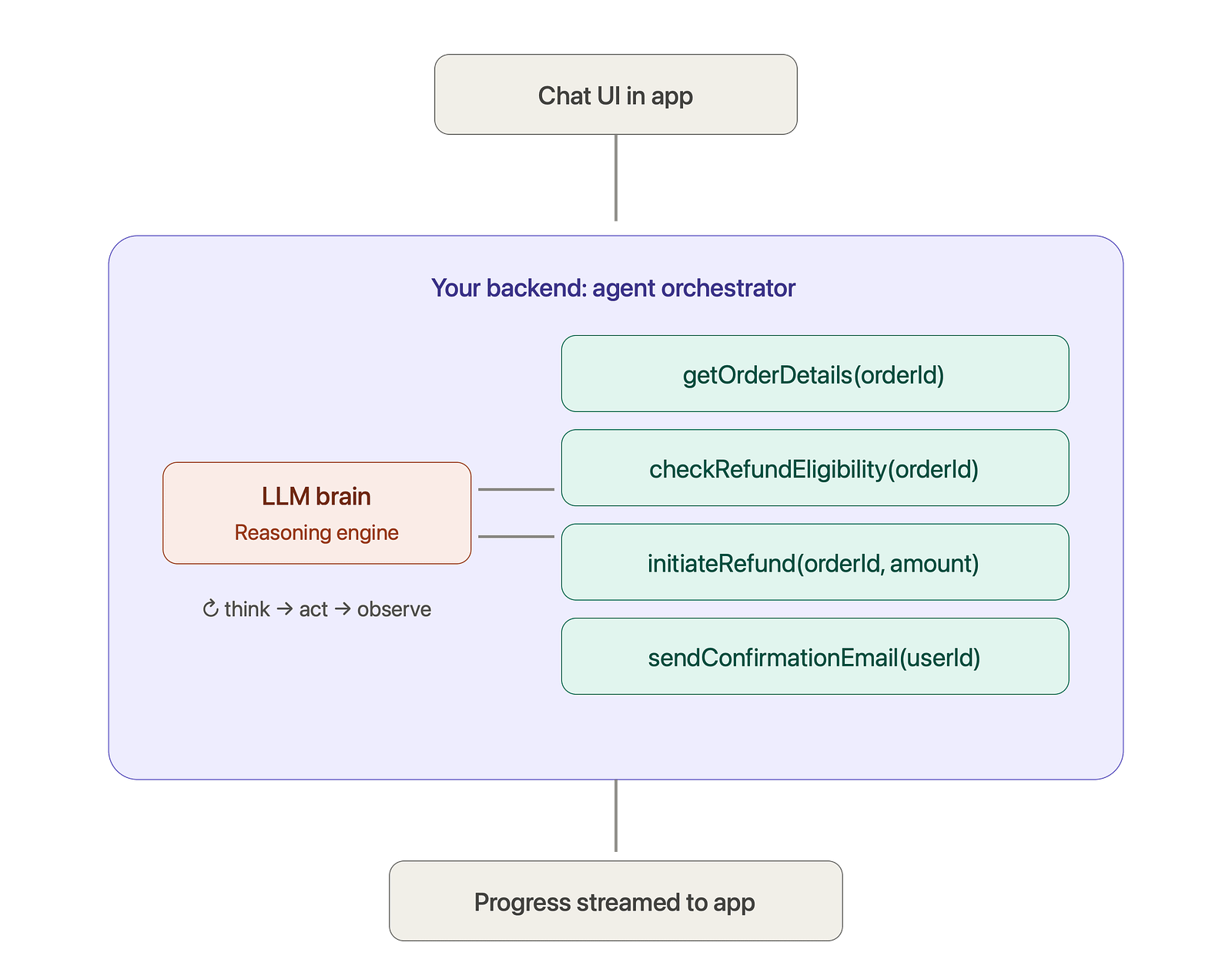
The user says, “My biryani never arrived, I want my money back.”
The agent thinks and acts:
-
Calls getOrderDetails and finds the order from 2 hours ago
-
Calls checkRefundEligibility and confirms it qualifies
-
Calls initiateRefund for 349 rupees
-
Calls sendConfirmationEmail
-
Replies: “So sorry about that! I have processed a full refund of 349 rupees. It will reach your account in 3 to 5 days. Confirmation sent to your email.”
The user experienced one message in, problem solved. That is the magic of agents.
Mobile-Specific Challenges With Agents
Here is what nobody tells you in the fancy demos. Agents on mobile bring real engineering headaches:
Latency and the waiting user. An agent task with 5 tool calls can take 15 to 30 seconds. A mobile user staring at a blank screen for 30 seconds will kill your app. Solutions: stream progress updates (“Checking your order… Processing refund…”), show step-by-step status like a delivery tracker, or let the task run in background and notify when done.
Network drops. Mobile networks are flaky. What happens if the connection dies after the refund tool ran but before the confirmation reached the app? Your agent tasks must be resumable on the backend, and your app should re-fetch task status on reconnect. Design the agent execution to be idempotent wherever possible.
Battery and data. If you run on-device models or stream long responses, watch battery drain and data usage. Users uninstall apps that heat their phones.
Permissions and trust. An agent that can spend money or delete data needs guardrails. The golden rule: reversible actions can be autonomous, irreversible actions need user confirmation. Checking order status? Autonomous. Issuing a 5,000 rupee refund? Show a confirmation sheet in the app first.
Part 5: Real-World Examples You Already Use
Theory is nice, but let us look at actual products, because you have probably used most of these without realizing which category they fall in.
Chatbot Examples
Swiggy and Zomato support chat. When you ask “where is my order,” you mostly get information and guided options. Largely chatbot behavior with structured flows on top.
Duolingo Max. Uses GPT-4 for “Explain My Answer” and roleplay conversations. It talks, teaches, and explains. Classic LLM chatbot use case, and a brilliant one.
Banking bots like HDFC’s Eva or SBI’s chat assistants. They answer account and product questions. Regulated industries deliberately keep bots restricted to information, and that is smart risk management, not laziness.
Agent Examples
Google’s Gemini in Android. Modern Gemini on Android can take actions across apps: “Find the pet-friendly hotels Priya sent me on WhatsApp and add them to my notes.” It reads context, uses app capabilities, and completes multi-step tasks. That is agent behavior at the OS level.
Perplexity’s shopping features and agentic browsers like Comet. You say “buy this,” and the system can navigate, fill forms, and complete a checkout flow. Actions, not just answers.
Customer support platforms like Intercom Fin and Zendesk AI agents. These now resolve a large share of support tickets end to end, issuing refunds, changing bookings, and updating accounts, escalating to humans only when stuck. Companies report resolution rates of 50 percent or more on routine tickets.
GitHub Copilot’s agent mode. You give it an issue, and it plans, edits multiple files, runs tests, observes failures, fixes them, and opens a pull request. If you want to feel what an agent is, use this once. The think-act-observe loop becomes crystal clear.
An End-to-End Mobile Scenario
Let me paint one complete picture for a travel app, because travel shows the contrast beautifully.
Chatbot version: User asks, “What is the baggage allowance on my flight?” Bot answers, “15 kg check-in and 7 kg cabin for your IndiGo booking.” Useful. Done in 2 seconds. One LLM call. Costs a fraction of a rupee.
Agent version: User says, “My meeting got cancelled, prepone my entire trip by one day.” The agent finds the flight, checks availability for the earlier date, calculates the fare difference, asks the user to confirm the 1,200 rupee change fee, rebooks the flight, then updates the hotel booking, then adjusts the airport cab, and finally updates the calendar. Five minutes of tool calls. Maybe 15 to 20 LLM calls. Costs a few rupees. But the user just saved an hour of frustrating manual work.
Both are valuable. They are just solving different classes of problems.
Part 6: How to Choose for YOUR App
This is the section you probably came for. Here is my practical decision framework, refined from real projects and conversations with dozens of developers in our community.
Ask These Five Questions
Question 1: Does the user need information or an outcome?
Information means chatbot. Outcome means agent. “What is my data usage?” is information. “Switch me to a cheaper plan” is an outcome.
Question 2: How many steps does a typical task involve?
One step, chatbot. Multiple dependent steps where step 2 depends on step 1’s result, agent.
Question 3: What is the cost of a mistake?
If the AI saying something slightly wrong is embarrassing but harmless, a chatbot is fine. If the AI doing something wrong loses money or data, you need an agent with strict guardrails, confirmations, and audit logs. And maybe you should start with a chatbot anyway.
Question 4: What is your budget and timeline?
A decent LLM chatbot with RAG: 2 to 4 weeks for a small team. A production-grade agent with tools, guardrails, and error handling: 2 to 4 months, plus ongoing costs that are 5 to 10 times higher per interaction because of multiple LLM calls.
Question 5: Is your backend ready?
Agents are only as powerful as their tools. If your backend does not have clean, well-documented APIs for the actions you want to automate, fix that first. An agent without good tools is just an expensive chatbot.
The Cheat Sheet
Your situation Build this FAQ and support questions Chatbot with RAG Onboarding help, feature discovery Chatbot Language learning, tutoring, companionship Chatbot “Do it for me” requests like booking, cancelling, rescheduling Agent Multi-app or multi-API workflows Agent Personal assistant features Agent, or hybrid Regulated actions with legal risk Chatbot first, agent later with heavy guardrails You are just starting with AI Chatbot, always
My Honest Recommendation: The Staircase Approach
Do not jump to agents because they are trendy. Climb this staircase:
Step 1: Launch an LLM chatbot with RAG on your app’s knowledge. Learn how users actually talk to AI. Collect real queries.
Step 2: Look at the data. You will find that maybe 30 percent of users are not asking questions, they are requesting actions. “Cancel my order.” “Change my address.” These are your agent use cases, validated by real demand.
Step 3: Add one tool. Just one. Maybe getOrderStatus. Your chatbot just became a baby agent. Measure everything.
Step 4: Add action tools one by one, with confirmations for anything irreversible. Expand slowly.
This staircase gives you user trust, engineering experience, and cost control, and each step delivers value on its own. Companies that jumped directly to full autonomous agents in 2024 and 2025 mostly ended up rolling back to this exact staircase.
Part 7: A Peek Into the Advanced World
If you have read this far, you deserve a glimpse of where this field is heading, because these concepts will dominate mobile AI over the next couple of years.
Multi-agent systems. Instead of one super-agent, you build a team: a planner agent, a search agent, a booking agent, and an orchestrator that coordinates them. Frameworks like CrewAI, LangGraph, and Google’s ADK make this practical. Think of it as microservices, but for AI reasoning.
MCP (Model Context Protocol). An open standard, started by Anthropic and now adopted widely across the industry, that lets any AI agent connect to any tool or data source through a common interface. Think of it as USB for AI tools. Instead of writing custom integration code for every API, you expose your service as an MCP server, and any agent can use it. As a mobile developer, watch this space closely, because app capabilities exposed through standard protocols may become as important as deep links are today.
Agent-to-agent communication. Standards are emerging for agents from different companies to talk to each other. Your travel app’s agent negotiating with an airline’s agent, machine to machine. Sounds like science fiction, but the protocols already exist.
On-device agents. As on-device models get stronger, agents that run fully on the phone, using app capabilities as tools without any cloud, become possible. Privacy-first, offline-capable, zero API cost. Android’s app functions and Apple’s App Intents are early building blocks of exactly this future. This, in my opinion, is the biggest opportunity for mobile developers in the coming years.
Summary
Let us compress this entire blog into a few lines you can carry with you:
-
A chatbot talks. An agent acts. That is the core difference.
-
The same LLM can power both. Architecture makes the difference: tools plus a think-act-observe loop plus autonomy equals agent.
-
Chatbots are cheaper, faster, safer, and easier. Agents are powerful, complex, and expensive. Both are the right choice for different problems.
-
On mobile, worry about latency, flaky networks, API key security, and battery. Stream progress for long agent tasks and confirm irreversible actions.
-
Start with a chatbot, study real user queries, then graduate to an agent one tool at a time. The staircase beats the leap.
The next time someone in a meeting says “let us add AI to the app,” you will be the person who asks the right question: “Do our users need answers, or do they need outcomes?”
That one question will save your team months of building the wrong thing.
If this helped you, share it with a fellow mobile developer who is still confused between the two. And tell me in the comments: what would you build first for your app, a chatbot or an agent, and why?
Happy coding!
Level Up Your Mobile Developer Interview !
Mastering AI for Android Developers
Your complete hands-on guide to integrating AI into Android apps — covering Generative AI, LLMs, on-device intelligence, AI APIs, real-world use cases, and practical implementation with modern Android development.
👉 Grab your copy now:
https://medium.com/@anandgaur2207/mastering-ai-for-android-developers-5cc6d62e7d21
Cracking the Mobile System Design Interview Book
Your complete practical guide to mastering Mobile System Design Interviews — covering scalable architecture, Android & iOS system design concepts, high-level design strategies, low-level design patterns, performance optimization, offline-first architecture, real-world case.
👉 Grab your copy now:
https://medium.com/@anandgaur2207/cracking-the-mobile-system-design-interview-book-8ff043db0359
Data Structures & Algorithms for Mobile App Developers Book
Master the Data Structures & Algorithms concepts every Android, iOS, Flutter, React Native, and KMP developer should know. Learn arrays, linked lists, trees, graphs, dynamic programming, searching, sorting, recursion, and problem-solving techniques with practical coding examples and interview-focused explanations.
👉 Grab your copy now:
https://medium.com/@anandgaur2207/data-structures-algorithms-for-mobile-app-developers-74db0ae17376?sharedUserId=anandgaur2207
Crack Android Interviews Like a Pro
Your complete Android interview preparation book — packed with real questions, deep explanations, and practical insights to help you stand out.
👉 Grab your copy now:
https://medium.com/@anandgaur2207/crack-android-interviews-with-confidence-the-only-handbook-youll-need-b87ec525f19c
iOS Developer Interview Handbook
From Swift fundamentals to advanced iOS concepts — a complete handbook to help you prepare smartly and confidently.
👉 Explore the book:
https://medium.com/@anandgaur2207/crack-ios-developer-interviews-with-confidence-the-complete-ios-developer-handbook-f1eabc3d7a21
Flutter Developer Interview Handbook
Ace your next Flutter interview with scenario-based questions, detailed explanations, and hands-on examples that make you stand out.
👉 Explore the book:
https://medium.com/@anandgaur2207/crack-flutter-developer-interviews-with-confidence-the-complete-flutter-developer-interview-6cb53996832c
React Native Developer Interview Handbook
Crack your next React Native interview with confidence!
This guide is packed with scenario-based questions, detailed explanations, and hands-on examples to help you stand out and succeed.
👉 Explore the book:
https://medium.com/@anandgaur2207/react-native-interview-crack-your-next-interview-with-confidence-0d7255a20fe1
Need 1:1 Career Guidance or Mentorship?
If you’re looking for personalized guidance, interview preparation help, or just want to talk about your career path in mobile development — you can book a 1:1 session with me on Topmate.
I’ve helped many developers grow in their careers, switch jobs, and gain clarity with focused mentorship. Looking forward to helping you too!
Found this helpful? Don’t forgot to clap 👏 and follow me for more such useful articles about Android development and Kotlin or buy us a coffee here ☕
If you need any help related to Mobile app development. I’m always happy to help you.
Follow me on: