AI Mobile Coders
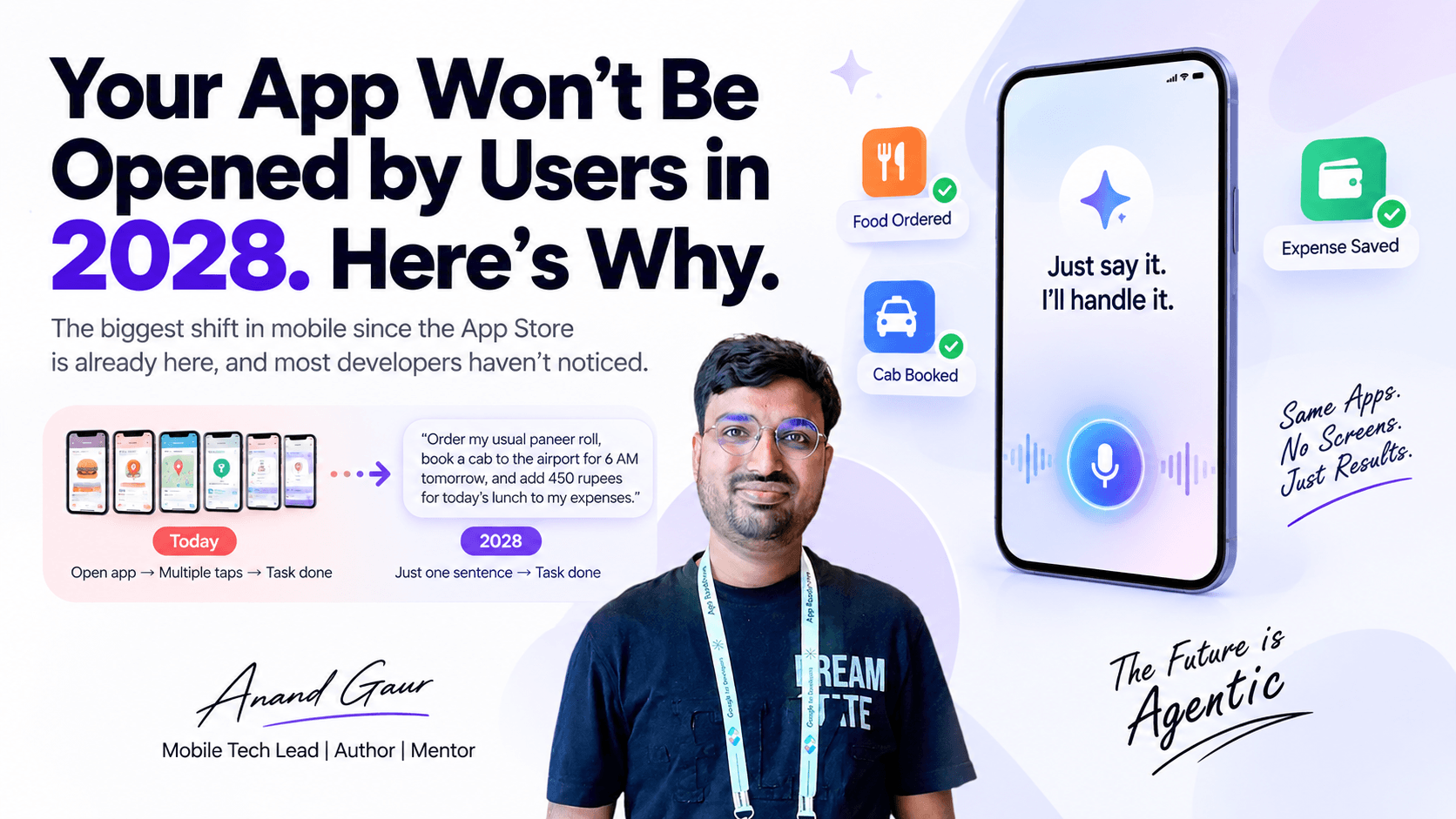
Your App Won't Be Opened by Users in 2028. Here's Why.
The biggest shift in mobile since the App Store is already here, and most developers haven't noticed.

It is a Tuesday evening in 2028.
Rahul is sitting on his sofa, tired after work. He picks up his phone and says:
“Order my usual paneer roll, book a cab to the airport for 6 AM tomorrow, and add 450 rupees for today’s lunch to my expenses.”
Ten seconds later, it is all done.
The food is ordered. The cab is booked. The expense is saved.
Here is the interesting part.
Rahul did not open a single app.
Three apps did real work for him. And he did not see even one screen from any of them.
This is not science fiction. The pieces to build this already exist on both Android and iOS today. And if you are a mobile developer, this changes almost everything about how you should think about your app.
In this article, I will explain what is happening, how it works under the hood, and what you should start doing right now.
How We Use Apps Today
For the last 15 years, every app has worked in the same way:
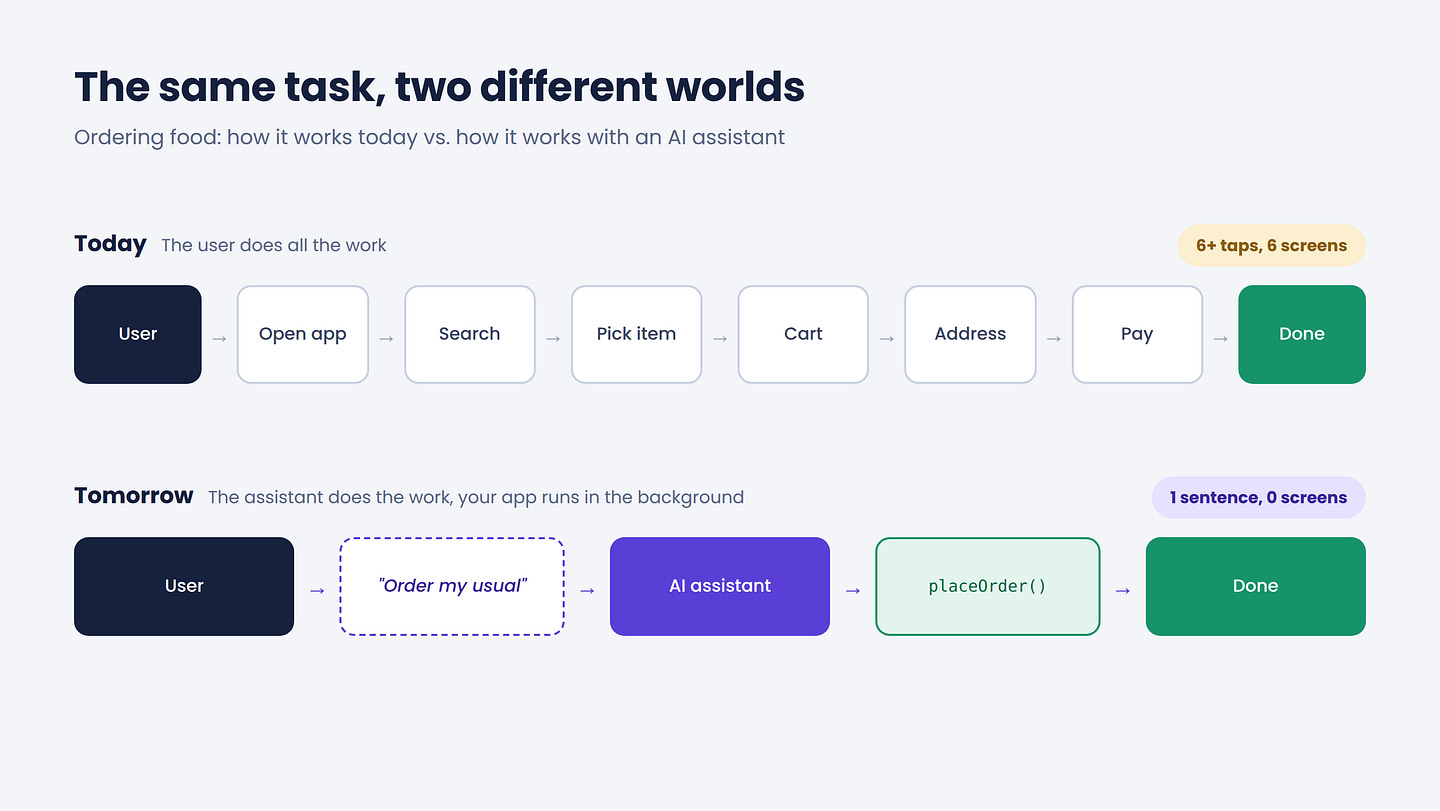
User → Open app → Navigate screens → Tap buttons → Task done
Want to order food? Open the app, search, pick the restaurant, add to cart, choose the address, pay. That is 6 to 8 taps, minimum.
We built our entire industry around this flow. We measure success by daily active users, session length, and screen views. We spend weeks perfecting onboarding screens, bottom navigation, and animations.
All of this assumes one thing:
The user will open your app.
That assumption is starting to break.
The New Flow
Here is the new model:
User → Talks to an AI assistant → Assistant calls your app’s functions → Task done
The user tells an assistant what they want. The assistant figures out which app can do it. Then it calls that app directly, in the background, without opening any UI.
Your app is still doing the work. It is just not showing its face anymore.
Think of Your App as a Restaurant
Today, your app is a restaurant where the customer walks in, reads the menu, and orders at the counter. The dining area, the menu design, the lighting, all of it matters.
Tomorrow, most customers will order through a delivery partner. They never see your restaurant. They only care whether the food is good and arrives on time.
Your kitchen matters more than ever. Your dining area matters much less.
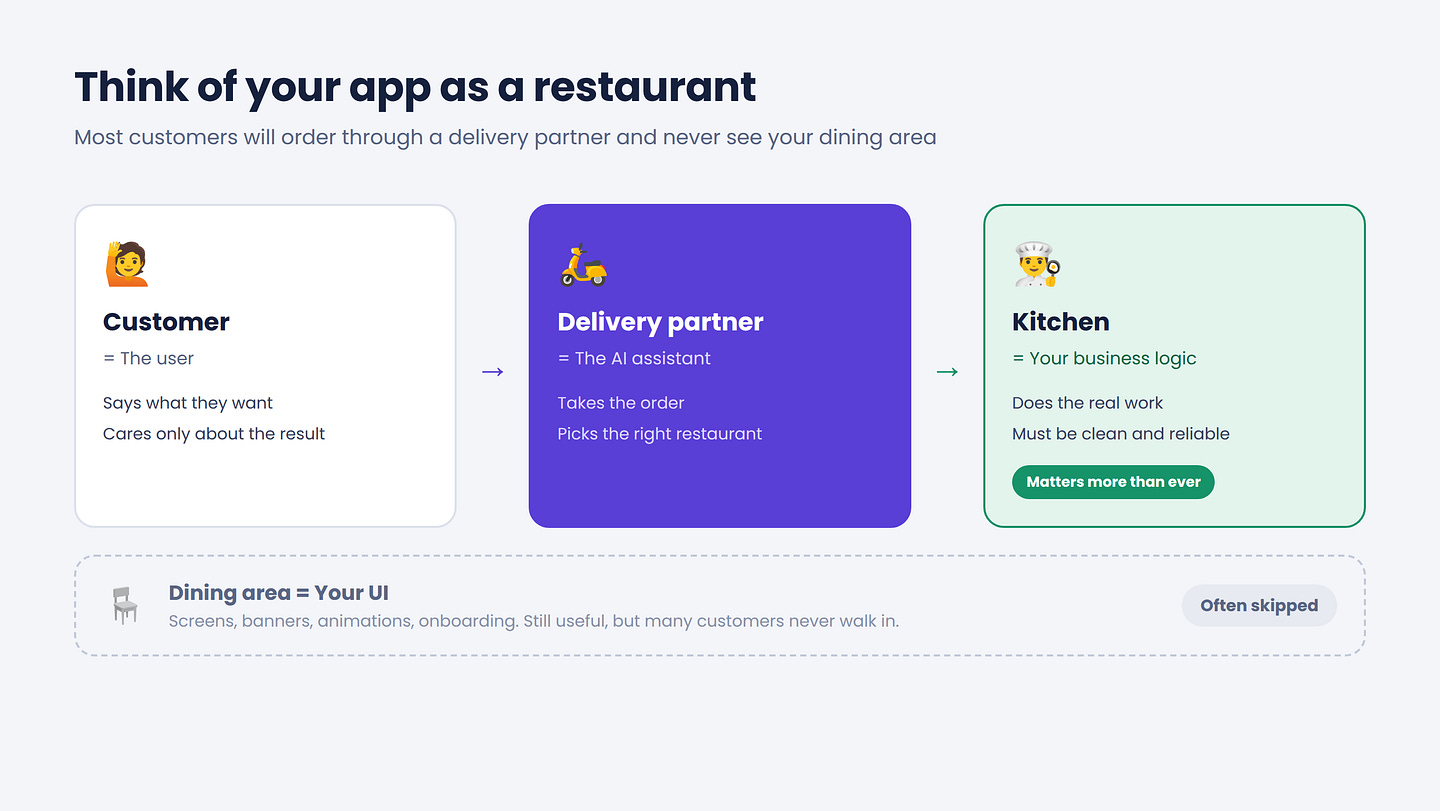
In this analogy, your business logic is the kitchen, and your UI is the dining area.
This Is Not a Guess. Google and Apple Are Both Building It.
When one company pushes an idea, it can be a trend. When Google and Apple push the same idea in the same year, it is a platform shift.
Google: Android is becoming an “intelligence system”
Google calls this idea the Intelligent OS. In their own blog, they say success is shifting from getting users to open your app to fulfilling their tasks and helping them get more done faster.
Read that line again.
Google is telling developers, as clearly as possible, that app opens are no longer the main goal.
To make this happen, Google introduced AppFunctions. It is an Android platform API with a Jetpack library that lets your app behave like an on-device MCP server. Your app exposes functions as tools, and agents and assistants like Gemini can use them.
It is already working in the real world. On the Galaxy S26 series, a user can ask Gemini to show pictures of their cat from Samsung Gallery. Gemini triggers the right function and shows the photos directly inside the Gemini app. The user never leaves Gemini.
And for apps that do not integrate at all, Google is building a backup plan. A UI automation framework lets agents run multi-step tasks on installed apps, starting with an early preview on the Galaxy S26 series and select Pixel 10 devices.
So either you give the agent a clean door into your app, or the agent will climb in through the window by tapping your UI like a robot.
The first option is clearly better for you.
Apple: Siri now talks to apps through App Intents
Apple is doing the same thing with iOS 27. The rebuilt Siri routes through App Intents. If your app exposes its actions as intents, it can take part in agentic flows across apps. If it does not, it is invisible to the new Siri.
Invisible. That is a strong word, and it is the right one.
How It Actually Works Under the Hood
Let me break this down in simple steps using Rahul’s expense request:
“Add 450 rupees for today’s lunch.”
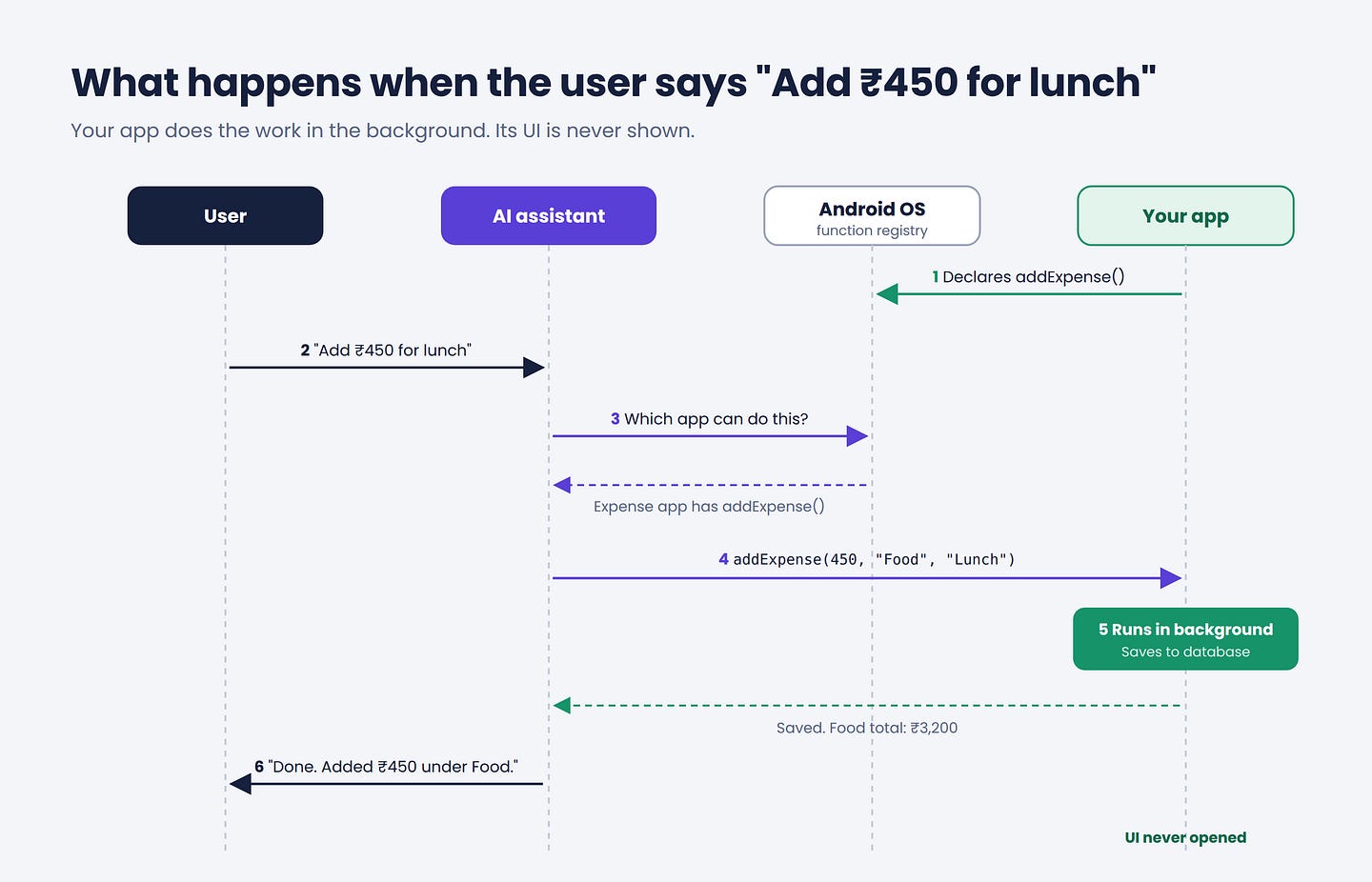
Step 1: Your app declares what it can do. Your expense app tells the operating system: “I have a function called addExpense. It takes an amount, a category, and an optional note.” Android keeps all such functions in a registry. Think of it like a phone directory, but for app abilities.
Step 2: The user speaks to the assistant. Rahul says his sentence to Gemini.
Step 3: The AI finds the right tool. The assistant checks which installed app can handle this. It finds addExpense in the expense app.
Step 4: The assistant calls your function. It fills in the values from Rahul’s sentence: amount = 450, category = "Food", note = "Lunch".
Step 5: Your function runs in the background. Your code saves the expense in your database and returns a result.
Step 6: The assistant replies. “Done. Added ₹450 under Food. You’ve spent ₹3,200 on food this month.”
Notice what did not happen. No splash screen. No home screen. No “Add Expense” form.
Your UI was never involved.
If you have worked with function calling or MCP, this will feel familiar. It is the same idea. The only difference is that the tools live inside apps on the phone, not on a server.
Let’s See the Code
Here is what exposing a function looks like on Android with the AppFunctions Jetpack library. This is a simplified example.
@AppFunctionSerializable
data class ExpenseResult(
    val id: String,
    val amount: Double,
    val category: String,
    val monthlyTotalForCategory: Double
)

class ExpenseFunctions(
    private val repository: ExpenseRepository
) {

    /**
     * Adds a new expense to the user’s expense tracker.
     *
     * Use this when the user wants to record money they spent,
     * for example “add 450 for lunch” or “I spent 200 on petrol”.
     *
     * @param amount The amount spent in Indian Rupees.
     * @param category The spending category, such as Food, Travel or Shopping.
     * @param note An optional short description of the expense.
     * @return The saved expense along with the monthly total for this category.
     */
    @AppFunction(isDescribedByKDoc = true)
    suspend fun addExpense(
        appFunctionContext: AppFunctionContext,
        amount: Double,
        category: String,
        note: String?
    ): ExpenseResult {
        val saved = repository.addExpense(amount, category, note)
        val total = repository.monthlyTotal(category)
        return ExpenseResult(saved.id, saved.amount, saved.category, total)
    }
}
Look closely at that KDoc comment.
KDoc is Kotlin’s documentation comment format, written inside /** */ above a function.
In normal code, comments are for other developers. Here, the comment is read by the AI. It helps the model understand when to call your function and what each parameter means.
This is a big mindset change.
Your KDoc is now your UI.
A vague comment is like a confusing button. The AI will not know when to use it.
Note: AppFunctions is still in experimental preview. The Jetpack library is in alpha, and Google has said the API may still change. Always check the official docs before you build.
Here is the same idea on iOS using App Intents:
struct AddExpenseIntent: AppIntent {
    static var title: LocalizedStringResource = “Add Expense”
    static var description = IntentDescription(
        “Records money the user has spent in their expense tracker.”
    )

    @Parameter(title: “Amount”)
    var amount: Double

    @Parameter(title: “Category”)
    var category: String

    @Parameter(title: “Note”)
    var note: String?

    func perform() async throws -> some IntentResult & ProvidesDialog {
        let total = try await ExpenseStore.shared.add(
            amount: amount,
            category: category,
            note: note
        )
        return .result(
            dialog: “Added ₹\(Int(amount)) to \(category). This month’s total is ₹\(Int(total)).”
        )
    }
}
Different syntax, same philosophy. Both platforms are asking you the same question:
“What can your app do, described in plain language, without any screens?”
A Real Example: What Changes for a Food Delivery App
Let’s take a food delivery app and compare the old world and the new one.
The old world
The team spends most of its effort on:
-
A beautiful home screen with banners and offers
-
Smart search and filters
-
A smooth cart and checkout flow
-
Push notifications to bring users back
Success means: “How many people opened the app today?”
The new world
The team now also needs to think about functions like:
-
searchRestaurants(query, location) -
reorderLastOrder() -
placeOrder(items, address, paymentMethod) -
trackOrder(orderId)
Success means: “How many orders were completed, from anywhere?”
Here is the hard truth.
If Rahul says “order my usual paneer roll” and your competitor’s app exposes a reorderLastOrder function but yours does not, the assistant will pick your competitor.
Not because their food is better. Because their app was easier for the AI to use.
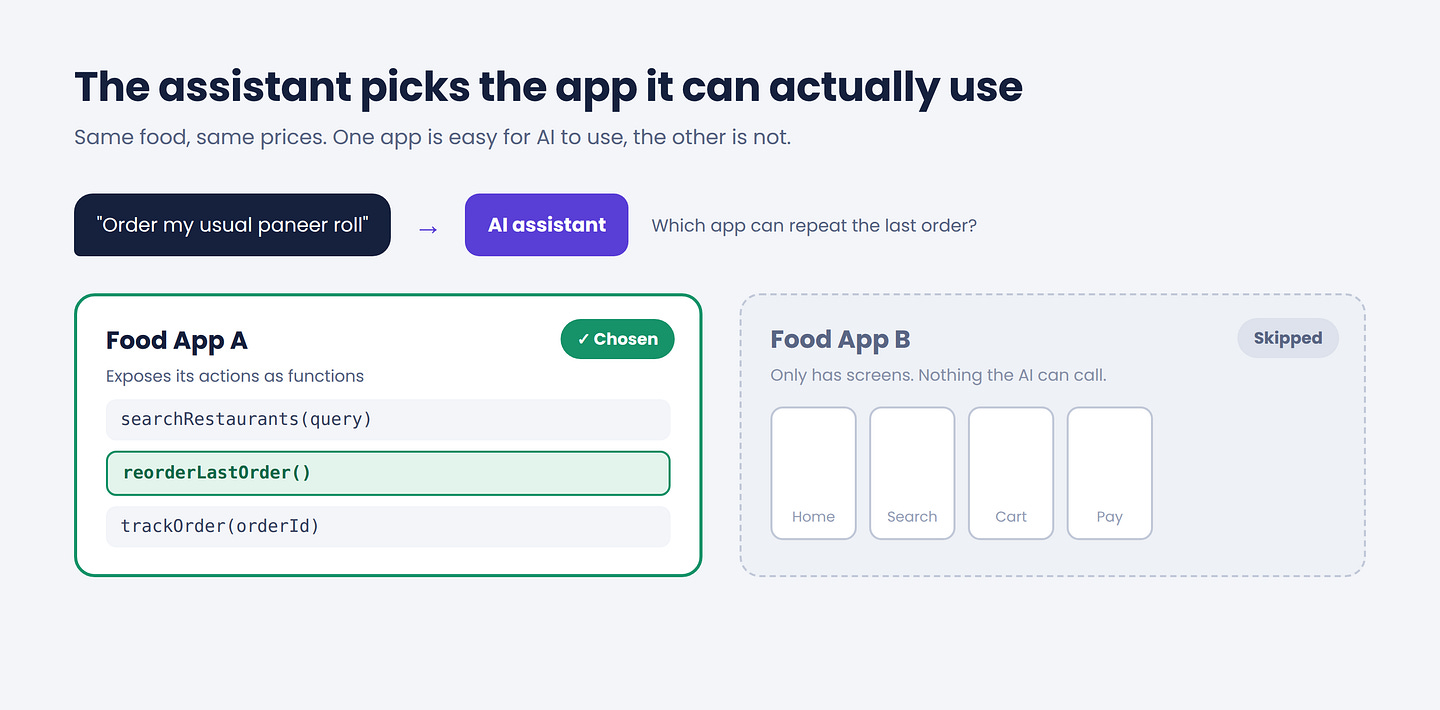
In the web world, we learned SEO: making your website easy for Google to understand. In the mobile world, we now need something similar.
Call it Agent Optimization: making your app easy for AI assistants to understand and use.
What This Means for You as a Developer
1. Start thinking in actions, not screens
For years, we planned apps screen by screen. Login screen, home screen, detail screen.
Now, start a second list: what are the 5 to 10 most important things a user does in my app? Each of those is a potential function an agent can call.
For an expense app, it could be: add expense, get monthly summary, set budget, find a transaction. That list is your new “screen map”.
2. Clean architecture is no longer optional
If your business logic is stuck inside Activities, Fragments, or ViewModels, you cannot expose it as a function. The agent does not have a ViewModel. It needs a clean, callable piece of logic.
Apps that already follow clean architecture, with use cases and repositories separated from UI, can expose functions quickly. Apps with messy code will need months of refactoring.
Good architecture used to be about maintainability. Now it is also about survival.
3. Write descriptions like you are explaining to a new teammate
AI models pick tools based on names and descriptions. Compare these two:
-
fun process(a: Double, b: String)with no comment -
fun addExpense(amount: Double, category: String)with a clear KDoc explaining when to use it
The second one will be picked correctly far more often. Clear naming was always good practice. Now it directly affects whether your app gets used.
4. Design for trust, especially for money
An agent should be able to check a balance freely. But should it place a ₹5,000 order without asking? Probably not.
For sensitive actions like payments, bookings, sending messages, or changing account settings, always design a confirmation step. The best agentic apps will be the ones users trust, not the ones that do the most things silently.
5. Your metrics will need to change
If users stop opening your app but keep completing tasks through it, your DAU chart will drop while your business actually grows. Teams that only watch DAU will panic for the wrong reasons.
Start tracking tasks completed, whether they happened inside your UI or through an agent.
So, Will Apps Actually Die?
No. And I want to be honest about this, because the title is meant to make you think, not to scare you.
Apps will not disappear. But the reason people open them will change.
People will still open apps for experiences like games and social feeds, for creative work like photo editing, for complex decisions like comparing laptops, and for trust moments like confirming a big payment.
But for quick, repetitive tasks like adding an expense, reordering food, booking a cab, or checking an order status, users will simply ask.
Opening an app for these will feel as old as typing a full website address into a browser instead of searching.
So the more accurate version of the title is this:
By 2028, users won’t open your app for the boring tasks. And the boring tasks are most of what apps do.
The Open Questions Nobody Has Solved Yet
This shift also creates real problems that the industry has not figured out:
-
Branding: If users never see your UI, how do they remember your brand?
-
Revenue: If your business depends on in-app ads or upselling on the home screen, what happens when nobody sees the home screen?
-
Competition: Who decides which app the assistant picks when three apps can do the same thing?
-
Control: How much power should Google and Apple have as the new gatekeepers between users and apps?
I don’t think anyone has perfect answers yet. But these questions tell you one thing: this shift is big enough to reshape business models, not just code.
What You Can Do This Week
You don’t need to rebuild your app. Start small:
-
List your app’s top 5 user actions. Write them as function names with plain-English descriptions.
-
Check your architecture. Can each of those actions run without any UI? If not, that is your first refactoring target.
-
Read the official docs for AppFunctions on Android and App Intents on iOS.
-
Build one function as an experiment. Pick the simplest, safest action, like “get monthly summary”, and expose it.
-
Talk to your product team. Share this shift early. The teams that plan for it now will be ready. The rest will be scrambling later.
Final Thoughts
When the App Store launched, many companies that already had websites thought, “Why do we need an app? People can just visit our site.” A few years later, many of them were playing catch-up.
We are at a similar moment now.
The question is no longer “How do I get users to open my app?”
The new question is:
“When a user asks their AI for help, will my app be the one that gets the job done?”
Your UI got you here. Your functions will take you forward.
Start building them now.
If this made you think, share it with a developer friend who is still only thinking about screens.
And tell me in the comments: which feature of your app would you expose to an AI agent first? 👇
If you found this helpful, share it with a fellow Mobile developer who is still shipping stretched phone UIs on tablets. They will thank you.
Level Up Your Mobile Developer Interview !
Mastering AI for Android Developers
Your complete hands-on guide to integrating AI into Android apps — covering Generative AI, LLMs, on-device intelligence, AI APIs, real-world use cases, and practical implementation with modern Android development.
👉 Grab your copy now:
https://medium.com/@anandgaur2207/mastering-ai-for-android-developers-5cc6d62e7d21
Cracking the Mobile System Design Interview Book
Your complete practical guide to mastering Mobile System Design Interviews — covering scalable architecture, Android & iOS system design concepts, high-level design strategies, low-level design patterns, performance optimization, offline-first architecture, real-world case.
👉 Grab your copy now:
https://medium.com/@anandgaur2207/cracking-the-mobile-system-design-interview-book-8ff043db0359
Data Structures & Algorithms for Mobile App Developers Book
Master the Data Structures & Algorithms concepts every Android, iOS, Flutter, React Native, and KMP developer should know. Learn arrays, linked lists, trees, graphs, dynamic programming, searching, sorting, recursion, and problem-solving techniques with practical coding examples and interview-focused explanations.
👉 Grab your copy now:
https://medium.com/@anandgaur2207/data-structures-algorithms-for-mobile-app-developers-74db0ae17376?sharedUserId=anandgaur2207
Crack Android Interviews Like a Pro
Your complete Android interview preparation book — packed with real questions, deep explanations, and practical insights to help you stand out.
👉 Grab your copy now:
https://medium.com/@anandgaur2207/crack-android-interviews-with-confidence-the-only-handbook-youll-need-b87ec525f19c
iOS Developer Interview Handbook
From Swift fundamentals to advanced iOS concepts — a complete handbook to help you prepare smartly and confidently.
👉 Explore the book:
https://medium.com/@anandgaur2207/crack-ios-developer-interviews-with-confidence-the-complete-ios-developer-handbook-f1eabc3d7a21
Flutter Developer Interview Handbook
Ace your next Flutter interview with scenario-based questions, detailed explanations, and hands-on examples that make you stand out.
👉 Explore the book:
https://medium.com/@anandgaur2207/crack-flutter-developer-interviews-with-confidence-the-complete-flutter-developer-interview-6cb53996832c
React Native Developer Interview Handbook
Crack your next React Native interview with confidence!
This guide is packed with scenario-based questions, detailed explanations, and hands-on examples to help you stand out and succeed.
👉 Explore the book:
https://medium.com/@anandgaur2207/react-native-interview-crack-your-next-interview-with-confidence-0d7255a20fe1
Need 1:1 Career Guidance or Mentorship?
If you’re looking for personalized guidance, interview preparation help, or just want to talk about your career path in mobile development — you can book a 1:1 session with me on Topmate.
I’ve helped many developers grow in their careers, switch jobs, and gain clarity with focused mentorship. Looking forward to helping you too!
Found this helpful? Don’t forgot to clap 👏 and follow me for more such useful articles about Android development and Kotlin or buy us a coffee here ☕
If you need any help related to Mobile app development. I’m always happy to help you.
Follow me on: