AI Mobile Coders
On-Device AI vs Cloud AI: Which Should Your Mobile App Use?

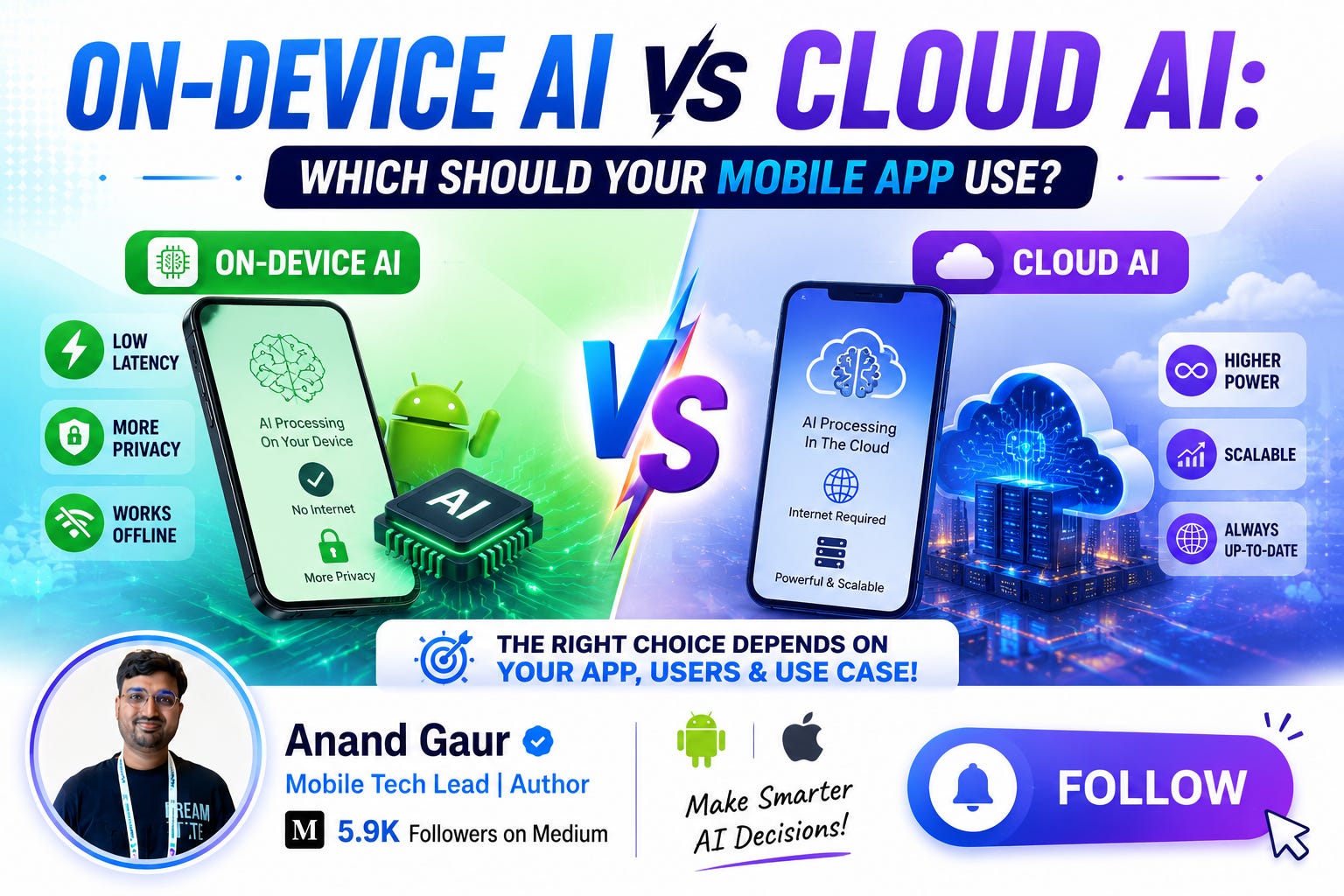
If you are a mobile developer in 2026, you cannot escape one question anymore:
“Should my app run AI on the device, or should it call a cloud API?”
Every product manager is asking for AI features. Every user expects them. And every developer is standing at this crossroad, confused between two paths.
In this blog, I will break down everything you need to know about On-Device AI and Cloud AI. What they are, how they actually work under the hood, when to use which one, real-world examples from apps you use every day, and a practical decision framework you can apply to your own app.
By the end, you will not need to read another blog on this topic. Let’s start from zero.
First, What Exactly Is “AI” in a Mobile App?
Before comparing the two approaches, let’s get one thing clear.
When we say “AI in a mobile app,” we usually mean a machine learning model. A model is basically a file. Yes, just a file. It contains millions (or billions) of numbers called weights. These weights were learned during training on huge amounts of data.
Your app gives this model some input (an image, some text, audio) and the model gives back an output (a label, a prediction, generated text). This process of getting output from a trained model is called inference.
Now here is the million-dollar question:
Where does this inference happen?
There are only two possible answers:
-
On the user’s phone → On-Device AI
-
On a server somewhere far away → Cloud AI
That’s it. Every AI feature in every mobile app falls into one of these two buckets (or a mix of both, which we will cover later).
What Is On-Device AI?
On-Device AI means the machine learning model lives inside your app (or on the phone), and all the processing happens right there on the user’s device. No internet needed. No data leaves the phone.
How does it actually work?
Here is the typical flow:
-
You (or your ML team) train a model, or you pick a pre-trained one.
-
The model is converted into a mobile-friendly format like TensorFlow Lite (.tflite), Core ML (.mlmodel), or ONNX.
-
This model file is bundled inside your app, or downloaded once after install.
-
When the user does something (takes a photo, types text), your app feeds that input to the model.
-
The phone’s hardware runs the inference and returns the result in milliseconds.
The hardware that makes this possible
This is where it gets interesting. Modern phones are not just phones anymore. They are small AI machines.
-
Apple ships a Neural Engine in every iPhone. The A17 Pro and A18 chips can do trillions of operations per second.
-
Google Pixel phones have the Tensor chip, built specifically to run models like Gemini Nano on the device.
-
Qualcomm Snapdragon chips come with a Hexagon NPU (Neural Processing Unit) that Android apps can tap into.
-
Samsung has its own NPUs in Exynos chips.
These NPUs are special processors designed only for AI math (matrix multiplications). They run models faster than the CPU while using much less battery.
Tools you will use as a mobile developer
For Android:
-
Gemini Nano via AI Core: Google’s on-device LLM, available through the AI Edge SDK
-
TensorFlow Lite / LiteRT: The classic choice for running custom models
-
ML Kit: Ready-made APIs for face detection, text recognition, barcode scanning, translation, and more
-
MediaPipe: For vision and gesture tasks
For iOS:
-
Core ML: Apple’s framework for running models on the Neural Engine
-
Apple Intelligence / Foundation Models framework: Direct access to Apple’s on-device LLM
-
Vision framework: Face detection, text recognition, image analysis
-
Create ML: Train simple models right on your Mac
Cross-platform:
-
ONNX Runtime Mobile
-
MediaPipe (works on both platforms)
-
llama.cpp / MLC LLM for running open-source LLMs on device
What Is Cloud AI?
Cloud AI is the opposite approach. The model lives on powerful servers, and your app talks to it over the internet.
How does it work?
-
The user does something in your app (asks a question, uploads a photo).
-
Your app sends that data to a server through an API call (usually REST or gRPC).
-
Massive GPUs on the server run the inference.
-
The result comes back to your app as a response.
Your app is basically just a messenger here. All the heavy lifting happens far away in a data center.
The big players
-
OpenAI API: GPT models for text, vision, and audio
-
Google Gemini API: Gemini Pro and Flash models via Firebase AI Logic or direct API
-
Anthropic Claude API: Strong reasoning and long-context tasks
-
AWS Bedrock, Azure OpenAI: Enterprise-grade hosted models
-
Firebase AI Logic: Google’s mobile-friendly wrapper that lets you call Gemini securely from Android and iOS without managing your own backend
Why cloud models are so powerful
The models running in the cloud are enormous. We are talking about models with hundreds of billions of parameters, running on clusters of GPUs that cost more than an apartment in Delhi.
Your phone, no matter how premium, simply cannot run these giants. A flagship phone has maybe 8 to 16 GB of RAM. A frontier cloud model needs hundreds of GBs just to load.
So cloud AI gives you access to intelligence that is physically impossible to fit in a pocket.
The Head-to-Head Comparison
Now let’s put them side by side. This is the section you will want to bookmark.
1. Latency (Speed)
On-Device: Inference happens in milliseconds. There is no network round trip. A face detection model can run at 30+ frames per second on a modern phone. This is why your camera app can blur the background in real time.
Cloud: Every request travels to a server and back. Even with great internet, you are looking at 300 ms to several seconds. For a chatbot, that’s fine. For a real-time camera filter, it’s a disaster.
Winner for real-time features: On-Device. It’s not even close.
2. Privacy
On-Device: User data never leaves the phone. Photos, messages, health data, everything stays local. This is a massive selling point. Apple built its entire AI marketing around this.
Cloud: User data travels over the network and is processed on someone else’s server. You need to think about encryption, data retention policies, GDPR, India’s DPDP Act, and user consent. One data leak can destroy your app’s reputation.
Winner: On-Device, especially for sensitive data like health, finance, and personal photos.
3. Cost
This one surprises many developers.
On-Device: Zero cost per inference. Whether your user runs the model once or ten thousand times, you pay nothing. The user’s phone does the work using the user’s battery.
Cloud: You pay for every single API call. Let’s do quick math. Suppose your app has 100,000 daily active users, and each user makes 10 AI requests per day. Even at a cheap rate of $0.001 per request, that is $1,000 per day, or $30,000 per month. And costs scale linearly with your success. More users means more bills.
Winner: On-Device for high-frequency features. Cloud costs can quietly kill a startup.
4. Model Power and Capability
On-Device: Models must be small, usually under a few GB. Gemini Nano, Apple’s on-device model, Phi-3 mini, quantized Llama variants. These are impressive but limited. They can summarize a paragraph, classify an image, or autocomplete a message. They cannot write a detailed legal analysis or reason through complex multi-step problems reliably.
Cloud: You get the smartest models on the planet. Long context windows (millions of tokens), advanced reasoning, tool calling, multimodal understanding. If your feature needs genuine intelligence, cloud is where it lives.
Winner: Cloud, by a huge margin, for complex tasks.
5. Offline Support
On-Device: Works on a flight, in a basement, in a village with no network. For India specifically, where connectivity is still patchy in many areas, this matters a lot.
Cloud: No internet, no AI. Your feature simply dies. You must design fallback experiences.
Winner: On-Device, obviously.
6. App Size and Device Resources
On-Device: Models add weight. A small vision model might be 5 to 20 MB, but an on-device LLM can be 1 to 4 GB. Users in markets with budget phones and limited storage will uninstall heavy apps. There are workarounds (downloading models after install, using Google’s AI Core which shares Gemini Nano across apps), but it is a real constraint.
Cloud: Your app stays lightweight. The model could be 500 GB on the server and your APK does not grow by a single byte.
Winner: Cloud.
7. Updating the Model
On-Device: Shipping a better model usually means an app update, or building your own model download system. Users on old app versions keep using old models.
Cloud: You upgrade the model on the server, and instantly every user on every version gets the improvement. No app release, no review process, no waiting.
Winner: Cloud.
8. Consistency Across Devices
On-Device: A flagship phone runs your model beautifully. A three-year-old budget phone might struggle, run slowly, or not support it at all. You have to handle this fragmentation, especially on Android.
Cloud: Every user gets exactly the same model, same quality, same speed (network aside), whether they own the latest iPhone or an entry-level Android.
Winner: Cloud.
Real-World Examples: What Are the Big Apps Doing?
Theory is good, but let’s see how apps you use daily have made this choice.
Google Photos
-
On-Device: Face grouping and basic image classification happen locally, so your gallery gets organized even offline.
-
Cloud: Advanced features like “Ask Photos” (searching your gallery with natural language) use cloud-based Gemini models.
-
On-Device: End-to-end encryption means messages cannot be processed in the cloud. Features like chat backup encryption run locally.
-
Cloud: Meta AI chatbot inside WhatsApp runs on Meta’s servers, because a capable assistant cannot fit on a phone.
Gboard (Google Keyboard)
-
On-Device: Next-word prediction, autocorrect, and Smart Reply run entirely on the device. Google even uses federated learning here, where the model improves from your typing patterns without your keystrokes ever leaving the phone. This is one of the best privacy-friendly AI architectures ever shipped.
Apple Intelligence
Apple’s approach is the perfect case study in hybrid design:
-
Simple tasks (summarizing a notification, rewriting a short email) run on the device.
-
Complex tasks go to Private Cloud Compute, Apple’s own servers designed so that even Apple cannot see your data.
-
Really complex tasks can be routed to ChatGPT, but only after asking the user.
Three tiers, each chosen based on task complexity. This is where the whole industry is heading.
Camera apps (Instagram, Snapchat, native cameras)
Portrait mode, background blur, AR filters, night mode. All of this is on-device, because you cannot send 30 frames per second to a server and wait for a response. The physics of networking simply do not allow it.
ChatGPT, Gemini, Claude apps
These are thin clients. Almost everything happens in the cloud. The apps themselves are mostly UI plus streaming logic.
Notice the pattern? Real-time and private features go on-device. Heavy intelligence goes to the cloud.
The Third Option: Hybrid AI (This Is the Future)
Here is the truth that most “vs” blogs miss: the best apps do not choose one. They use both, intelligently.
A hybrid architecture typically works like this:
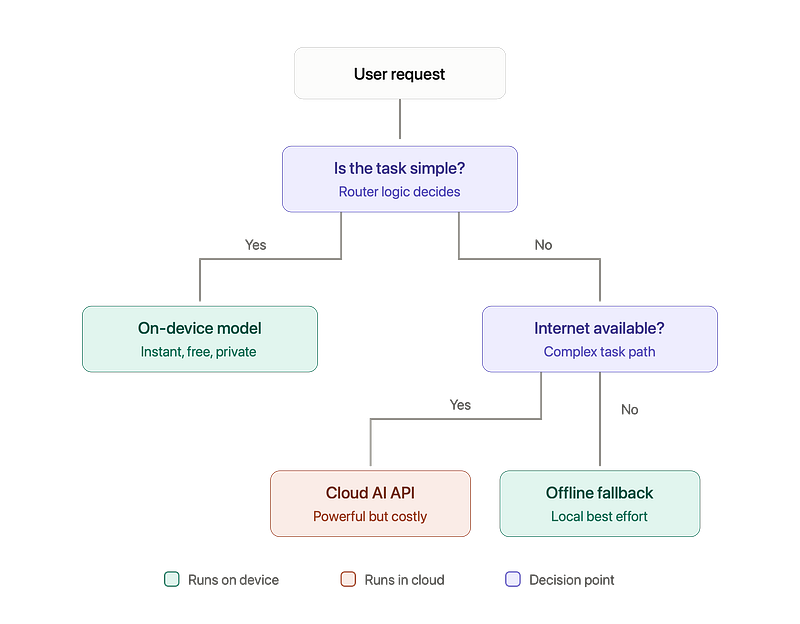
Practical hybrid patterns you can implement today
Pattern 1: Router pattern Write a small piece of logic that classifies each request as “simple” or “complex.” Simple goes to Gemini Nano or your local model. Complex goes to the Gemini or GPT API. Your costs drop dramatically because most requests are simple.
Pattern 2: On-device first, cloud enhance Show an instant on-device result immediately, then refine it with a cloud call in the background. The user perceives your app as blazing fast. Photo editing apps love this pattern.
Pattern 3: Preprocessing on device Instead of sending a full 5 MB photo to the cloud, run a small on-device model that extracts only what is needed (a face crop, detected text, an embedding vector) and send just that. You save bandwidth, reduce latency, and improve privacy in one move.
Pattern 4: Cloud with offline fallback Use the cloud model as your primary, but keep a small local model as backup. If the network fails, the user still gets a decent (if simpler) experience instead of an error screen.
A Practical Decision Framework
When you are designing your next AI feature, ask these five questions in order:
Question 1: Does the feature need real-time speed (under 100 ms)? Yes → On-Device. Full stop. Camera features, gesture detection, live translation overlays.
Question 2: Is the data highly sensitive? Health data, private photos, messages, financial info → strongly prefer On-Device. If you must use cloud, invest heavily in security and be transparent with users.
Question 3: Does the task need frontier-level intelligence? Complex reasoning, long document analysis, high-quality content generation → Cloud. On-device models are not there yet.
Question 4: How often will users trigger this feature? Many times per day per user → On-Device saves you serious money. Occasionally → Cloud cost is manageable.
Question 5: Do your users have reliable internet and modern phones? Budget devices, poor connectivity (very relevant for Indian markets) → On-Device or hybrid with offline fallback becomes almost mandatory.
If your answers conflict (need both privacy AND heavy intelligence), that is your signal to build a hybrid architecture.
Advanced Concepts Worth Knowing
If you want to go deeper than the average developer, these are the topics to explore.
Quantization
Models are trained with 32-bit or 16-bit precision numbers. Quantization converts them to 8-bit or even 4-bit. The model becomes 4 to 8 times smaller and much faster, with only a small quality drop. This is the single most important technique that made on-device LLMs possible. When you see “Gemma 4-bit quantized,” this is what it means.
Knowledge Distillation
A large “teacher” model trains a small “student” model to imitate its outputs. The student captures much of the teacher’s ability in a fraction of the size. Most good on-device models are distilled versions of larger ones.
Federated Learning
The model gets trained across thousands of user devices without raw data ever leaving any phone. Only small weight updates are sent to the server and aggregated. Gboard is the most famous production example.
NPU Delegation
When you run a TFLite model, you can choose where it executes: CPU, GPU, or NPU. Choosing the right delegate can make inference 5 to 10 times faster and dramatically reduce battery drain. On Android, look at NNAPI’s successor, the TFLite delegates and vendor SDKs like Qualcomm’s QNN.
Streaming Responses
For cloud LLMs, always stream tokens to the UI as they arrive instead of waiting for the full response. Perceived latency drops massively. Users forgive a slow answer that starts appearing instantly; they do not forgive a frozen spinner.
Token Cost Optimization
For cloud AI, learn about prompt caching, choosing smaller model tiers (Flash or Mini variants) for simple tasks, and batching requests. Teams have cut their AI bills by 80 percent just with smart model routing.
Common Mistakes Developers Make
-
Using a cloud LLM for something a tiny local model can do. Classifying text into 5 categories does not need GPT. A 5 MB on-device classifier does it faster and free.
-
Ignoring offline scenarios. Your AI feature should degrade gracefully, not crash or show endless spinners.
-
Putting API keys inside the app. Never call OpenAI or Gemini APIs directly from the client with an embedded key. Attackers will extract it within hours and burn your credits. Always route through your backend or use services like Firebase AI Logic that handle this properly.
-
Not testing on low-end devices. Your on-device model that flies on a Pixel 9 might take 8 seconds on a budget phone from 2022. Test on real hardware across the price spectrum.
-
Forgetting battery impact. Running heavy on-device inference continuously (like a live camera model) drains battery fast. Profile it, throttle frame rates, and pause when the app is backgrounded.
-
Not planning for cost at scale. Model your cloud AI costs at 10x and 100x your current user base before launch. Many teams get shocked bills after a viral moment.
So, What Should YOUR App Use?
Let me give you the honest, no-fluff answer.
-
Building a camera, keyboard, fitness, or health feature? Start on-device.
-
Building a chatbot, content generator, or complex assistant? Start with cloud.
-
Building a serious product for scale? Design hybrid from day one. Route simple tasks locally, complex tasks to the cloud, and always have an offline story.
The “On-Device vs Cloud” debate has a simple resolution: it was never a war. They are two tools in the same toolbox. The best mobile developers of this decade will be the ones who know exactly when to reach for which one.
The intelligence is moving in both directions at once. Cloud models keep getting smarter, and phones keep getting more capable of running serious models locally. Your job as a mobile developer is to stand in the middle and architect the bridge.
If this blog helped you understand On-Device and Cloud AI clearly, share it with a fellow mobile developer who is still confused. And follow me for more deep dives on mobile development and AI.
Happy coding!
Level Up Your Mobile Developer Interview !
Mastering AI for Android Developers
Your complete hands-on guide to integrating AI into Android apps — covering Generative AI, LLMs, on-device intelligence, AI APIs, real-world use cases, and practical implementation with modern Android development.
👉 Grab your copy now:
https://medium.com/@anandgaur2207/mastering-ai-for-android-developers-5cc6d62e7d21
Cracking the Mobile System Design Interview Book
Your complete practical guide to mastering Mobile System Design Interviews — covering scalable architecture, Android & iOS system design concepts, high-level design strategies, low-level design patterns, performance optimization, offline-first architecture, real-world case.
👉 Grab your copy now:
https://medium.com/@anandgaur2207/cracking-the-mobile-system-design-interview-book-8ff043db0359
Data Structures & Algorithms for Mobile App Developers Book
Master the Data Structures & Algorithms concepts every Android, iOS, Flutter, React Native, and KMP developer should know. Learn arrays, linked lists, trees, graphs, dynamic programming, searching, sorting, recursion, and problem-solving techniques with practical coding examples and interview-focused explanations.
👉 Grab your copy now:
https://medium.com/@anandgaur2207/data-structures-algorithms-for-mobile-app-developers-74db0ae17376?sharedUserId=anandgaur2207
Crack Android Interviews Like a Pro
Your complete Android interview preparation book — packed with real questions, deep explanations, and practical insights to help you stand out.
👉 Grab your copy now:
https://medium.com/@anandgaur2207/crack-android-interviews-with-confidence-the-only-handbook-youll-need-b87ec525f19c
iOS Developer Interview Handbook
From Swift fundamentals to advanced iOS concepts — a complete handbook to help you prepare smartly and confidently.
👉 Explore the book:
https://medium.com/@anandgaur2207/crack-ios-developer-interviews-with-confidence-the-complete-ios-developer-handbook-f1eabc3d7a21
Flutter Developer Interview Handbook
Ace your next Flutter interview with scenario-based questions, detailed explanations, and hands-on examples that make you stand out.
👉 Explore the book:
https://medium.com/@anandgaur2207/crack-flutter-developer-interviews-with-confidence-the-complete-flutter-developer-interview-6cb53996832c
React Native Developer Interview Handbook
Crack your next React Native interview with confidence!
This guide is packed with scenario-based questions, detailed explanations, and hands-on examples to help you stand out and succeed.
👉 Explore the book:
https://medium.com/@anandgaur2207/react-native-interview-crack-your-next-interview-with-confidence-0d7255a20fe1
Need 1:1 Career Guidance or Mentorship?
If you’re looking for personalized guidance, interview preparation help, or just want to talk about your career path in mobile development — you can book a 1:1 session with me on Topmate.
I’ve helped many developers grow in their careers, switch jobs, and gain clarity with focused mentorship. Looking forward to helping you too!
Found this helpful? Don’t forgot to clap 👏 and follow me for more such useful articles about Android development and Kotlin or buy us a coffee here ☕
If you need any help related to Mobile app development. I’m always happy to help you.
Follow me on: