AI Mobile Coders
How LLMs Actually Work: Everything Mobile Developers Need to Know

You use LLMs every single day. ChatGPT helps you debug that weird Gradle error. GitHub Copilot writes half your boilerplate. Gemini explains a crash log faster than Stack Overflow ever did.
But here is an honest question. Do you actually know what happens inside an LLM when you type a prompt and hit enter?
Most mobile developers treat LLMs like a magic box. Prompt goes in, answer comes out. And that works fine, until it does not. The moment you try to build an AI feature inside your own app, the magic box starts asking you questions. What is a token? Why is my API bill so high? Why does the model confidently give wrong answers? Should I run the model on the device or in the cloud?
This blog answers all of that. We will start from absolute zero and go deep, step by step. By the end, you will understand LLMs well enough to design, build, and debug AI features in your mobile apps with confidence.
Grab a coffee. This is a long one, but I promise it will not feel like a textbook.
Part 1: What Is an LLM, Really?
LLM stands for Large Language Model. Let us break those three words down.
Language Model: A language model is a program that has learned patterns of human language. Its one and only core skill is surprisingly simple: given some text, predict what word comes next.
That is it. That is the whole trick.
If I say “The weather today is very”, a language model predicts words like “hot”, “cold”, or “pleasant”. It does not predict “keyboard” or “elephant” because those words almost never appear after that phrase in real human writing.
Large: The “large” refers to two things. First, the amount of text the model learned from, which is basically a huge chunk of the internet, books, code, and articles. Second, the number of parameters inside the model. Parameters are like adjustable knobs, and modern models have billions of them. GPT-4 class models are rumored to have over a trillion. For comparison, a typical Android app might have a few thousand configuration values. An LLM has billions of learned numbers working together.
Here is the part that surprises everyone. Everything an LLM does, writing essays, fixing your Kotlin code, translating Hindi to English, explaining recursion, all of it emerges from that one skill: predicting the next word, over and over again.
Think of it like this. Your phone keyboard’s next word suggestion is a tiny language model. An LLM is that same idea, scaled up a million times, until something almost magical happens: the predictions become so good that they look like understanding.
Part 2: Tokens, the Currency of LLMs
Before we go deeper, you need to understand tokens, because everything in the LLM world revolves around them. Your API pricing is in tokens. Your context limits are in tokens. Your latency depends on tokens.
Here is the thing: LLMs do not actually see words. They see tokens.
A token is a chunk of text. It might be a full word, part of a word, or even a single character. The model breaks your input into these chunks using a process called tokenization.
For example, the sentence:
“Android development is fun”
might become these tokens:
[“Android”, “ development”, “ is”, “ fun”]
Simple English words are usually one token each. But a longer or rarer word like “internationalization” might split into multiple tokens like [“intern”, “ational”, “ization”]. Code, emojis, and non-English languages like Hindi often take more tokens per word.
A rough rule of thumb for English: 1 token is about 4 characters, or about three-quarters of a word. So 1,000 tokens is roughly 750 words.
Why should a mobile developer care?
Three practical reasons:
-
Cost. LLM APIs charge per token, both for input and output. If your app sends the entire chat history with every request, your bill grows fast. Understanding tokens is understanding your cloud bill.
-
Context window. Every model has a maximum number of tokens it can handle in one go, called the context window. It includes your prompt plus the response. If your app feeds a huge document to the model, you need to know whether it fits.
-
Latency. Models generate output one token at a time. A 500 token response takes noticeably longer than a 50 token response. On mobile, where users expect instant feedback, this directly affects your UX decisions, like whether to stream the response.
Keep tokens in the back of your mind. We will keep coming back to them.
Part 3: How Does the Model Actually Predict?
Now the fun part. What happens inside the model when it predicts the next token?
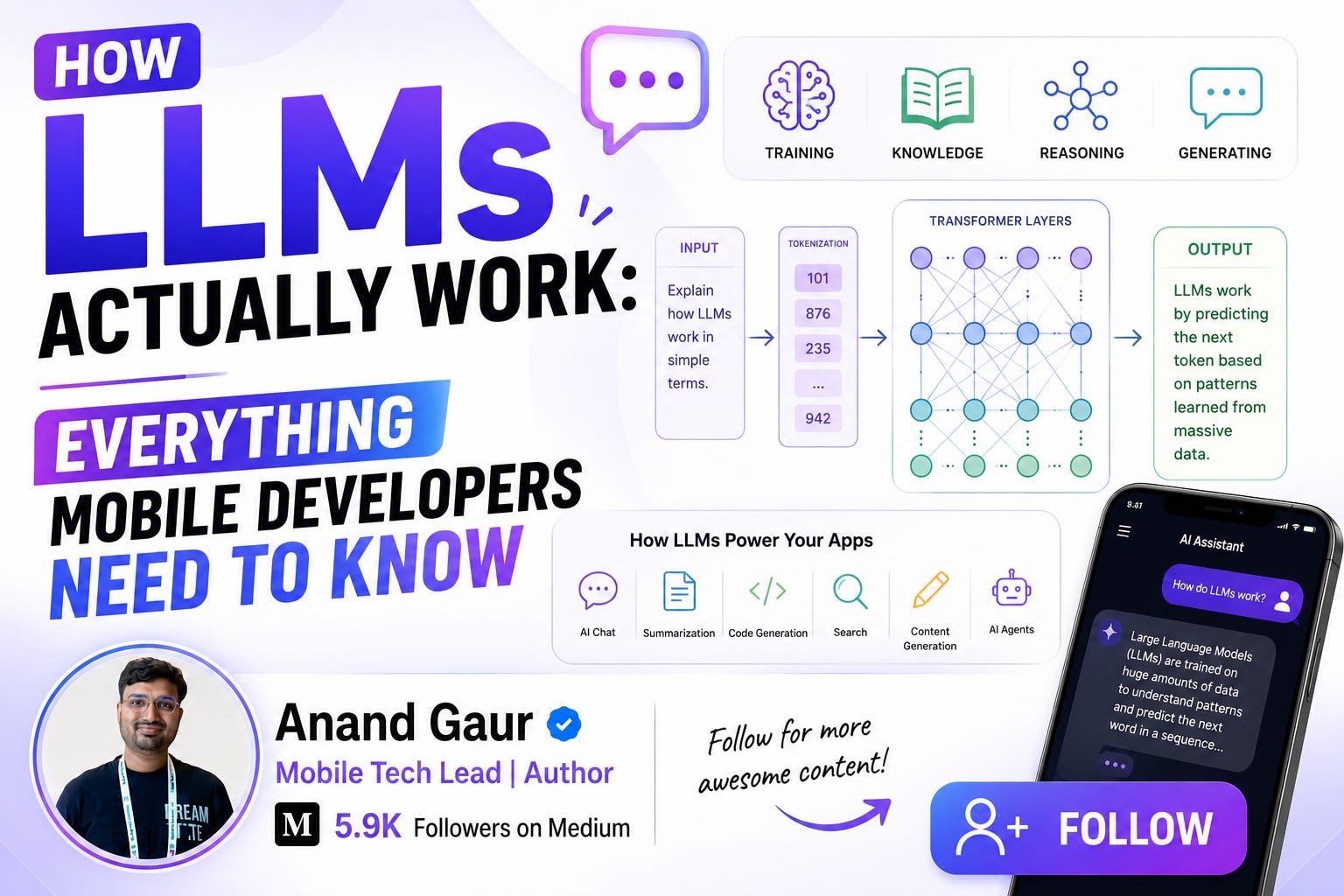
At a high level, the flow looks like this:
-
Your text is broken into tokens.
-
Each token is converted into numbers, called embeddings.
-
Those numbers flow through a giant neural network called a Transformer.
-
The network outputs a probability score for every possible next token.
-
One token is picked from those probabilities.
-
That token is added to the text, and the whole process repeats for the next token.
Let us unpack the important pieces one by one, in plain language.
Embeddings: Turning Words into Meaning
Computers only understand numbers. So each token gets converted into a long list of numbers called an embedding vector. Think of it as the token’s coordinates in a giant “meaning space”.
The beautiful part is that these coordinates capture meaning. Words with similar meanings end up close together in this space. “King” and “Queen” are neighbors. “Kotlin” and “Swift” are neighbors. “Pizza” and “RecyclerView” are very far apart.
A famous example: if you take the vector for “King”, subtract “Man”, and add “Woman”, you land very close to the vector for “Queen”. The model has literally learned the relationship between these concepts as geometry.
As a mobile developer, you might have already used embeddings without realizing it. Semantic search features, “similar products” recommendations, and smart photo search all work by comparing embedding vectors. We will see a real use case later.
The Transformer: The Engine Inside
The neural network architecture behind every modern LLM is called the Transformer. It was introduced in a 2017 Google paper with the iconic title “Attention Is All You Need”. The T in GPT literally stands for Transformer.
Before Transformers, language models read text one word at a time, left to right, like a slow reader with a short memory. By the time they reached the end of a long sentence, they had half forgotten the beginning.
The Transformer changed the game with one core idea: attention.
Attention: The Superpower
Attention lets the model look at all the words in the input at once and decide which words matter most for understanding each word.
Take this sentence:
“The app crashed because it ran out of memory.”
What does “it” refer to? You instantly know “it” means “the app”. The attention mechanism is how the model figures out the same thing. When processing the word “it”, the model computes attention scores against every other word, and “app” gets a high score. The meaning of “app” then flows into the model’s understanding of “it”.
Here is a mobile analogy. Think of attention like ConstraintLayout. Every view (word) can define relationships with every other view (word) in the layout, no matter how far apart they are. Old models were like LinearLayout, where each element only really knew about its immediate neighbor.
Modern LLMs stack dozens of these attention layers on top of each other. Early layers learn simple things like grammar and word pairing. Deeper layers learn abstract things like tone, logic, intent, and even code structure. Nobody explicitly programmed any of this. It all emerged from training.
Part 4: How Are LLMs Trained?
An LLM’s life has three major phases. Understanding them explains a lot of the model’s behavior, including its weird flaws.
Phase 1: Pre-training (Learning the Language)
The model is shown a massive amount of text: websites, books, Wikipedia, code from GitHub, research papers. Trillions of tokens.
The training game is simple. Hide the next word and ask the model to guess it.
Input: “To create a new Activity in Android, you need to…” Model guesses: “register” Actual next word: “declare”
Every time the model guesses wrong, its billions of parameters are adjusted slightly so it does a little better next time. Repeat this trillions of times on thousands of GPUs for months, and the model slowly absorbs grammar, facts, reasoning patterns, coding styles, everything.
This phase is insanely expensive. Training a frontier model costs hundreds of millions of dollars in compute. This is why only a handful of companies train foundation models, and everyone else builds on top of them.
After pre-training, the model is knowledgeable but rough. Ask it “How do I learn Android development?” and it might just continue your sentence with “in 30 days? Many people ask this question on forums…” because that is what raw internet text looks like. It completes text, it does not converse.
Phase 2: Instruction Tuning (Learning to Be Helpful)
Next, the model is fine-tuned on a smaller, high quality dataset of instruction and response pairs, written or curated by humans.
Instruction: “Explain what a Fragment is in Android.” Ideal response: “A Fragment represents a reusable portion of your app’s UI…”
After seeing hundreds of thousands of such examples, the model learns a new behavior: when someone asks something, answer it properly. This is the step that transforms a raw text predictor into a chat assistant.
Phase 3: RLHF (Learning Human Preferences)
Finally comes Reinforcement Learning from Human Feedback. The model generates multiple answers to the same prompt, and human reviewers rank them from best to worst. The model is then trained to prefer the kind of answers humans rank highly: helpful, safe, well formatted, honest about uncertainty.
This is why ChatGPT feels polite and structured. That personality was trained into it, layer by layer, using human preferences.
Here is a mobile analogy for the whole pipeline. Pre-training is like learning all of computer science in college. Instruction tuning is like your first job training where you learn how to actually complete tickets. RLHF is like code review feedback that shapes your style over the years.
Part 5: Inference, or What Happens When You Hit Send
Training happens once, in a data center. Inference happens every time someone uses the model. As an app developer, inference is the part you interact with, so let us go deep here.
When your app sends a prompt, the model generates the response one token at a time. Each new token is picked based on probabilities. And you, the developer, get several knobs to control how that picking happens.
Temperature: The Creativity Knob
Temperature controls how random the token selection is.
-
Low temperature (0 to 0.3): The model almost always picks the highest probability token. Output becomes focused, consistent, and predictable. Perfect for code generation, data extraction, and classification.
-
Medium temperature (0.5 to 0.8): A good balance. Natural for chat.
-
High temperature (0.9+): The model takes more risks and picks less likely tokens more often. Output becomes creative and varied, but also more error prone. Good for brainstorming and creative writing.
Practical tip: if your app extracts structured data from text, like parsing a receipt into JSON, keep temperature at 0. If your app writes fun captions for photos, raise it.
Top-p and Top-k: Filtering the Choices
These settings limit which tokens are even considered. Top-k says “only consider the k most likely tokens”. Top-p says “only consider the smallest set of tokens whose combined probability crosses p”. They prevent the model from occasionally picking a truly bizarre token. Most of the time, the defaults are fine, but you will see these in every LLM SDK, including Gemini and OpenAI SDKs, so it is good to know what they mean.
Max Tokens: The Output Budget
This caps how long the response can be. Setting it correctly saves money and prevents runaway responses. If your app needs a one line summary, do not allow a 2,000 token essay.
Context Window: The Model’s Working Memory
The context window is the total number of tokens the model can see at once, including your prompt, the conversation history, and the response being generated. Modern models support very large windows, from 128K tokens to over a million in some models.
Here is the crucial thing developers miss: LLMs have no memory between API calls. None. Zero.
When you chat with ChatGPT and it “remembers” your earlier messages, that is only because the app resends the entire conversation history with every single request. The model itself is stateless, like a REST API.
For mobile developers, this has direct consequences:
-
Your chat feature must store history and send it with each call.
-
Longer conversations mean more input tokens, which means higher cost and latency per message.
-
At some point, old messages must be trimmed or summarized to stay within the context window. A common pattern is to keep the last N messages plus a running summary of everything older.
Streaming: The UX Saver
Because tokens are generated one by one, most LLM APIs support streaming, where tokens are sent to your app as they are produced instead of waiting for the full response.
On mobile, streaming is not optional, it is essential. Waiting 8 seconds staring at a spinner feels broken. Watching the answer type itself out feels alive. Users perceive streamed responses as dramatically faster even when total time is the same.
In Android, you would typically consume a streaming response as a Kotlin Flow and append chunks to your UI state. In the Gemini SDK it looks something like this:
val model = GenerativeModel(
    modelName = “gemini-3.5-flash”,
    apiKey = BuildConfig.GEMINI_API_KEY
)

viewModelScope.launch {
    model.generateContentStream(prompt).collect { chunk ->
        _uiState.update { it.copy(response = it.response + chunk.text) }
    }
}
A few lines of code, and your app suddenly feels like ChatGPT.
Part 6: Why LLMs Hallucinate (and Lie So Confidently)
Ask an LLM about a library that does not exist, and it might happily explain its API, complete with code samples. This is called hallucination, and it is the single most important limitation to understand before shipping AI features.
Why does it happen? Go back to the core mechanic. The model predicts plausible next tokens. It was never trained to say true things. It was trained to say likely sounding things. Most of the time, the most likely continuation happens to be true, because the training data is mostly accurate. But when the model does not know something, it does not have a built in “I don’t know” reflex. It just keeps generating the most plausible sounding tokens, which produces confident, fluent, wrong answers.
The model also has a knowledge cutoff. It only knows what existed in its training data. Ask it about a library version released last month and it will either admit ignorance or, worse, guess.
What this means for your app:
-
Never use raw LLM output for facts that matter (medical, legal, financial) without verification.
-
For factual features, use grounding techniques like RAG, which we will cover soon.
-
Design your UI to set expectations. A small “AI generated, may contain mistakes” note is now standard.
-
For structured output, validate everything. If the model returns JSON, parse it defensively. It will occasionally return malformed JSON, and your app should retry or fallback, not crash.
Part 7: Cloud LLMs vs On-Device LLMs, the Mobile Developer’s Big Decision
This is where our world gets interesting. As a mobile developer, you have two ways to bring an LLM into your app, and choosing between them is a real architectural decision.
Option 1: Cloud LLMs (API Based)
Your app sends the prompt to a server (OpenAI, Google Gemini, Anthropic Claude), the model runs on their GPUs, and the response comes back over the network.
Pros:
-
Access to the most powerful models available.
-
No impact on app size or device performance.
-
Model improvements arrive without an app update.
Cons:
-
Requires internet. No offline support.
-
Per request cost that scales with your user base.
-
User data leaves the device, which raises privacy questions.
-
Network latency on top of generation time.
One critical security note: never put your API key inside the app. APKs can be decompiled in minutes, and a leaked key means someone else runs their bills on your account. Always route LLM calls through your own backend, or use a mobile friendly gateway like Firebase AI Logic, which lets you call Gemini securely without embedding raw keys.
Option 2: On-Device LLMs
The model file lives on the phone and runs on the phone’s CPU, GPU, or NPU. No network involved.
Pros:
-
Works completely offline.
-
Zero per request cost. A million requests cost you nothing.
-
Data never leaves the device. Massive privacy win.
-
No network latency.
Cons:
-
On-device models are much smaller (1B to 8B parameters vs hundreds of billions in the cloud), so they are noticeably less capable.
-
Model files are large, often 1 to 4 GB even after compression.
-
They consume RAM and battery, and older devices struggle.
How Do Huge Models Even Fit on a Phone? Quantization.
A model’s parameters are normally stored as high precision numbers (16 or 32 bits each). Quantization compresses them into lower precision numbers, like 4 bits. It is conceptually similar to compressing a RAW photo into a JPEG. You lose a little quality, but the size drops dramatically. A 4 bit quantized 3B parameter model can shrink to around 2 GB and run surprisingly well on a modern flagship phone.
The On-Device Ecosystem in 2026
The tooling has matured fast:
-
Gemini Nano ships inside Android via AICore on supported Pixel and flagship devices, exposed through the ML Kit GenAI APIs for tasks like summarization, proofreading, and rewriting.
-
Apple’s Foundation Models framework gives iOS developers direct access to the on-device model behind Apple Intelligence, with just a few lines of Swift.
-
MediaPipe LLM Inference API lets you run open models like Gemma on Android and iOS.
-
llama.cpp and MLC LLM let you run quantized open source models (LLaMA, Mistral, Qwen) on both platforms.
The Practical Answer: Hybrid
Most serious apps end up hybrid. Use on-device models for fast, private, simple tasks like classifying a message, suggesting a reply, or summarizing a note. Fall back to cloud models for heavy tasks like long document analysis or complex reasoning. Your architecture decides per feature, not per app.
Part 8: Real World Use Cases in Mobile Apps
Enough theory. Where do LLMs actually live inside real apps you use daily?
1. Smart reply and compose. Gmail and WhatsApp suggest replies based on the incoming message. Under the hood: the conversation context goes into a small model, which generates 2 or 3 short candidate replies. This is a perfect on-device use case, private and fast.
2. Summarization. Notification summaries in iOS, article summaries in news apps, meeting notes in productivity apps. The prompt is essentially: “Summarize this text in 2 lines.” Simple prompt, huge UX value.
3. In-app support chatbots. Swiggy, Zomato, and banking apps use LLM powered bots as the first support layer. The LLM is grounded in the company’s help docs (via RAG) so it answers from real policy, not imagination.
4. Semantic search. Google Photos style search where you type “beach trip with dog” and get matching photos. This uses embeddings. Every photo gets an embedding vector, your query gets one too, and the app finds the closest vectors. No keyword matching involved.
5. Language features. Real time translation, grammar correction, tone rewriting (“make this message more polite”). Duolingo built entire conversation practice features on LLMs.
6. Developer facing features. Crash log explanation, code review bots, automated release notes from commit history. Even Android Studio itself now has Gemini built in.
7. Voice assistants and agents. Speech to text converts your voice to text, an LLM figures out intent and generates the response, and text to speech speaks it back. Modern assistants are basically LLM pipelines with audio on both ends.
Part 9: Let’s Build One: Anatomy of an AI Feature
Let us make this concrete. Say you are building a notes app and want an “AI Summarize” button. Here is the full thinking process, the same one you would use for any LLM feature.
Step 1: Choose the deployment. Summaries of personal notes are privacy sensitive, and the task is simple. If the device supports Gemini Nano, use the on-device ML Kit Summarization API. Otherwise, fall back to a cloud call through your backend.
Step 2: Design the prompt. Prompts have structure. A good pattern is: role, task, constraints, input.
You are a note summarization assistant.
Summarize the note below in at most 3 bullet points.
Use simple language. Do not add information that is not in the note.

Note:
<user’s note text here>
That last constraint, “do not add information”, directly reduces hallucination.
Step 3: Handle the response in your architecture. Treat the LLM like any unreliable remote data source. Wrap it in a repository, expose it through your ViewModel as a sealed UI state (Loading, Streaming, Success, Error), and stream tokens into the UI.
Step 4: Plan for failure. Timeouts, malformed output, rate limits, offensive content. Every one of these needs a graceful path. Retry with backoff for transient errors. Show the original note untouched if summarization fails. Never let an AI failure block a core feature.
Step 5: Control cost. Cache summaries so re-opening a note does not re-generate. Set max tokens. Trim giant notes before sending. Log token usage per feature so you can see cost per user.
Notice something? Steps 3 to 5 are just solid mobile engineering. LLM features are 20 percent AI and 80 percent the engineering discipline you already have.
Part 10: Two Advanced Ideas You Will Definitely Meet
RAG: Giving the Model Your Data
Retrieval Augmented Generation solves two problems at once: hallucination and the knowledge cutoff.
The idea: instead of hoping the model knows your data, you fetch the relevant data yourself and paste it into the prompt.
The flow:
-
Split your documents (FAQs, policies, product data) into chunks and store each chunk’s embedding in a vector database.
-
When the user asks a question, embed the question and find the most similar chunks.
-
Send the model a prompt like: “Answer the question using only the following context: <chunks>. Question: <user question>.”
Now the model answers from your actual documents. This is how every serious “chat with our support” and “chat with your PDF” feature works. For mobile, the retrieval usually happens on your backend, though on-device vector search is becoming practical too.
Function Calling: Letting the Model Use Your App
Function calling (also called tool use) lets the model trigger real actions. You describe your app’s functions to the model, like bookCab(pickup, drop) or getOrderStatus(orderId). When the user says “where is my order?”, the model does not guess. It responds with a structured request: call getOrderStatus with this ID. Your app executes the real function, returns the result to the model, and the model turns it into a friendly answer.
This is the foundation of AI agents, and it is how voice driven app control is being built right now. If you learn one advanced concept this year, learn this one.
Part 11: Common Mistakes Mobile Developers Make
-
Shipping API keys in the app. Worth repeating. Decompile and done. Use a backend or Firebase AI Logic.
-
Not streaming responses. A 10 second spinner kills the feature. Stream everything user facing.
-
Trusting model output blindly. Always validate structured output, always sanitize before displaying, always expect nonsense occasionally.
-
Sending the whole world as context. More context is not always better. It costs money, adds latency, and can even confuse the model. Send what is relevant.
-
Ignoring older devices for on-device AI. A 3B model that flies on a Pixel 9 may choke a budget phone. Always have a capability check and a fallback.
-
No usage limits. One curious user hammering your AI button can burn real money. Rate limit per user from day one.
-
Treating prompts as code that never changes. Prompts are product surface. Version them, test them, and iterate based on real outputs.
Part 12: The Mental Model to Take Away
If you remember only five things from this entire blog, remember these:
-
An LLM is a next token predictor scaled to an extreme, and everything else emerges from that.
-
Tokens are the currency. Cost, speed, and limits are all measured in tokens.
-
The model is stateless. Memory is your job, and it works by resending history.
-
LLMs generate plausible text, not guaranteed truth. Ground them with RAG, constrain them with prompts, validate their output.
-
For mobile, the cloud vs on-device decision shapes everything: privacy, cost, capability, and offline behavior.
LLMs are not replacing mobile developers. But they have quietly become a new layer of the mobile stack, sitting right alongside networking, storage, and UI. The developers who understand this layer, not just how to call it but how it works, are the ones who will build the standout apps of the next few years.
The magic box is open now. Go build something with it.
If this helped you, share it with a fellow mobile developer who still thinks LLMs are magic. And follow me for more deep dives on AI and mobile development.
Level Up Your Mobile Developer Interview !
Mastering AI for Android Developers
Your complete hands-on guide to integrating AI into Android apps — covering Generative AI, LLMs, on-device intelligence, AI APIs, real-world use cases, and practical implementation with modern Android development.
👉 Grab your copy now:
https://medium.com/@anandgaur2207/mastering-ai-for-android-developers-5cc6d62e7d21
Cracking the Mobile System Design Interview Book
Your complete practical guide to mastering Mobile System Design Interviews — covering scalable architecture, Android & iOS system design concepts, high-level design strategies, low-level design patterns, performance optimization, offline-first architecture, real-world case.
👉 Grab your copy now:
https://medium.com/@anandgaur2207/cracking-the-mobile-system-design-interview-book-8ff043db0359
Crack Android Interviews Like a Pro
Your complete Android interview preparation book — packed with real questions, deep explanations, and practical insights to help you stand out.
👉 Grab your copy now:
https://medium.com/@anandgaur2207/crack-android-interviews-with-confidence-the-only-handbook-youll-need-b87ec525f19c
iOS Developer Interview Handbook
From Swift fundamentals to advanced iOS concepts — a complete handbook to help you prepare smartly and confidently.
👉 Explore the book:
https://medium.com/@anandgaur2207/crack-ios-developer-interviews-with-confidence-the-complete-ios-developer-handbook-f1eabc3d7a21
Flutter Developer Interview Handbook
Ace your next Flutter interview with scenario-based questions, detailed explanations, and hands-on examples that make you stand out.
👉 Explore the book:
https://medium.com/@anandgaur2207/crack-flutter-developer-interviews-with-confidence-the-complete-flutter-developer-interview-6cb53996832c
React Native Developer Interview Handbook
Crack your next React Native interview with confidence!
This guide is packed with scenario-based questions, detailed explanations, and hands-on examples to help you stand out and succeed.
👉 Explore the book:
https://medium.com/@anandgaur2207/react-native-interview-crack-your-next-interview-with-confidence-0d7255a20fe1
Need 1:1 Career Guidance or Mentorship?
If you’re looking for personalized guidance, interview preparation help, or just want to talk about your career path in mobile development — you can book a 1:1 session with me on Topmate.
I’ve helped many developers grow in their careers, switch jobs, and gain clarity with focused mentorship. Looking forward to helping you too!
Found this helpful? Don’t forgot to clap 👏 and follow me for more such useful articles about Android development and Kotlin or buy us a coffee here ☕
If you need any help related to Mobile app development. I’m always happy to help you.
Follow me on: