AI Mobile Coders
What Is a Context Window? Why Every Mobile Developer Should Understand It

If you have ever added an AI chat feature to your app and noticed that the AI suddenly “forgets” what the user said ten messages ago, you have already met the context window. You just did not know its name.
Today, almost every mobile developer is touching AI in some form. Maybe you are calling the Gemini API from your Android app, or using OpenAI in your Flutter project, or experimenting with on-device models like Gemini Nano. And in all of these cases, there is one concept that silently controls what your AI can and cannot do.
That concept is the context window.
In this blog, we will go from the absolute basics to advanced techniques, all in simple language, and everything from a mobile developer’s point of view. By the end, you will understand what a context window is, how it works, why it matters for your app, how it affects your API bill, and how to design around its limits like a pro.
Let’s start from zero.
AI Has a Short-Term Memory
Imagine you are talking to a friend who has a strange condition. He can only remember the last 5 minutes of your conversation. Anything you said before that is completely gone from his mind.
If you told him your name 10 minutes ago, he has forgotten it. If you want him to remember it, you have to repeat it.
An AI model works exactly like this friend.
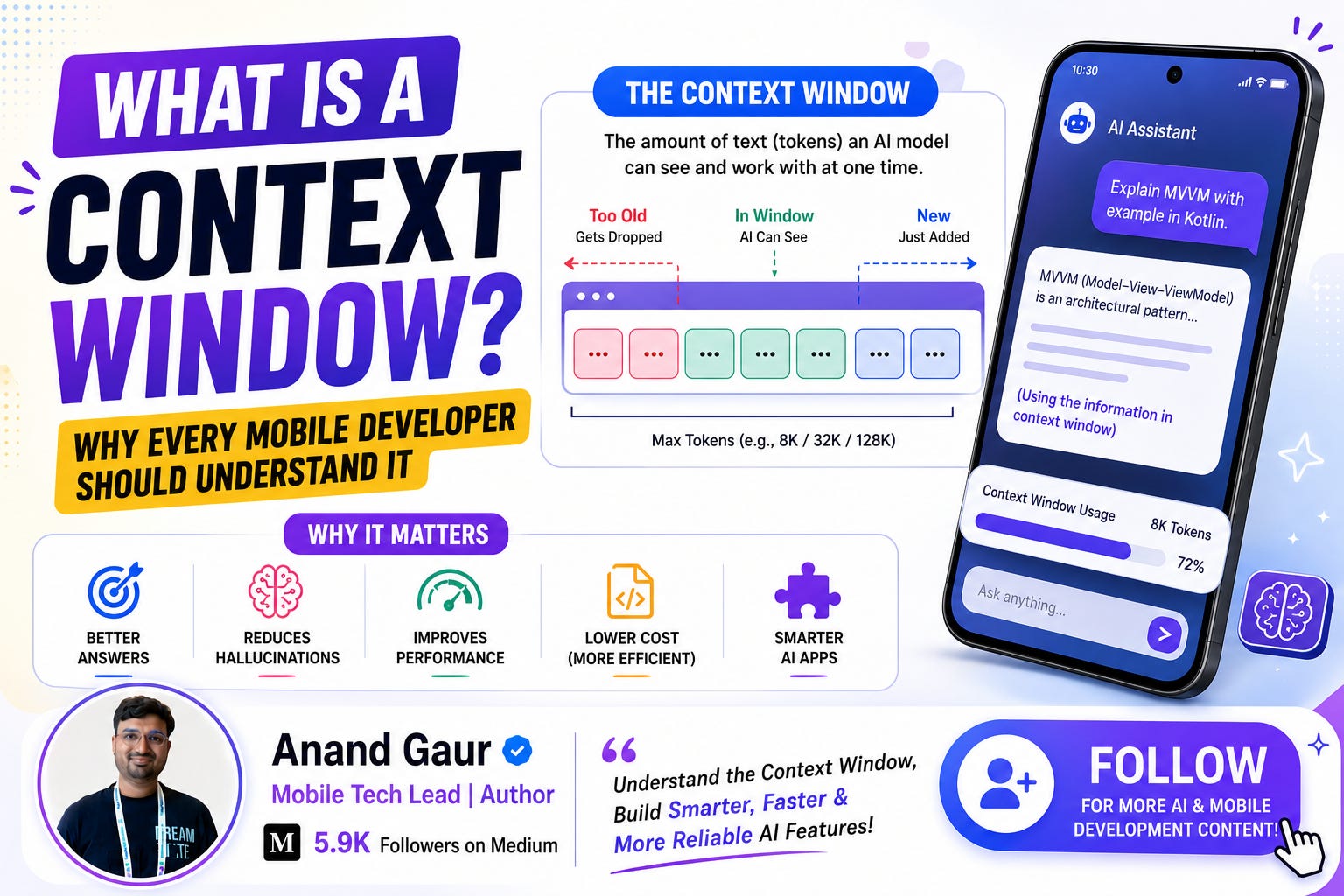
The context window is the model’s short-term memory. It is the maximum amount of text the model can “see” at one time. This includes:
-
Your system prompt (instructions you give the model)
-
The entire conversation history (all user and AI messages)
-
Any documents, code, or data you attach
-
The response the model is currently generating
If the total goes beyond the context window limit, something has to be dropped. And whatever gets dropped, the model behaves as if it never existed.
That is the whole concept in one line: the context window is the maximum text an AI model can pay attention to in a single request.
Now let’s go deeper.
First, Understand Tokens (Because Context Is Measured in Tokens)
Context windows are not measured in words or characters. They are measured in tokens.
A token is a small chunk of text. It can be a full word, part of a word, a space, or a punctuation mark. The model does not read text like humans. It first breaks everything into tokens and then processes those tokens.
Some quick examples:
-
“Hello” is 1 token
-
“Understanding” might become 2 tokens: “Under” + “standing”
-
“RecyclerView” might become 3 tokens: “Rec” + “ycler” + “View”
-
An emoji can be 1 to 3 tokens
A rough rule of thumb for English:
1 token is approximately 0.75 words. So 100 tokens is roughly 75 words.
This means:
-
A short chat message is around 10 to 30 tokens
-
A typical Medium blog is around 1,500 to 3,000 tokens
-
A medium-sized Kotlin file can be 2,000 to 5,000 tokens
-
A full novel is around 100,000+ tokens
One important thing for Indian developers: Hindi, Hinglish, and other non-English text usually consume more tokens than English for the same meaning. So if your app supports Indian languages, your context fills up faster. Keep this in mind while budgeting.
So when someone says “this model has a 128K context window”, it means the model can handle roughly 96,000 words of combined input and output in a single request.
How the Context Window Actually Works Under the Hood
You do not need a PhD to understand this. Here is the simple version.
Modern AI models are built on an architecture called the Transformer. The magic of a Transformer is a mechanism called attention. Attention allows every token to “look at” every other token to understand meaning.
For example, in the sentence “The app crashed because it ran out of memory”, the model uses attention to figure out that “it” refers to “the app”.
Now here is the catch. If every token looks at every other token, the amount of work grows very fast as text gets longer. Double the tokens, and the computation roughly becomes four times heavier. This is why context windows have limits. It is not a random restriction. Longer context means:
-
More computation (slower responses)
-
More memory usage on the servers
-
Higher cost per request
So the context window is basically a practical limit that model providers set based on how much computation they can handle while keeping the model fast and accurate.
What happens when you cross the limit?
Two things can happen, depending on how you have set things up:
-
The API throws an error saying your input exceeds the maximum context length.
-
Older messages get silently dropped or truncated (if you or your SDK trims the history), and the model simply loses that information.
The second one is more dangerous, because your app keeps working but the AI starts giving weird, inconsistent answers. Users will say “your AI is dumb, it forgot what I said”, and you will have no error logs to explain it.
Context Window Sizes: A Quick Reality Check
Different models have very different context sizes, and these numbers keep growing every year. To give you a general sense of scale:
-
Early models (like the first ChatGPT era) had around 4K to 8K tokens
-
Then models moved to 32K and 128K tokens
-
Modern frontier models like Gemini, Claude, and GPT families now offer 200K to 1 million+ tokens
-
On-device models (like Gemini Nano on Android) have much smaller windows, often in the few thousand tokens range
The exact numbers change frequently, so always check the official documentation of the model you are using. But the mental model stays the same: cloud models have huge windows, on-device models have small windows, and both have hard limits.
A 1 million token window sounds unlimited, right? It is not. A million tokens can get consumed by a large codebase, a long PDF, hours of chat history, or a video transcript. And more importantly, bigger context brings its own problems, which we will discuss soon.
Why Should a Mobile Developer Care? (The Heart of This Blog)
You might be thinking, “I just call an API. Why should I worry about all this?”
Here are five very real reasons.
1. Your chat feature will break in ways you cannot debug
Suppose you build a customer support chatbot inside your app. A user has a long conversation, 60 to 70 messages. If you keep sending the full history with every request, at some point you will hit the context limit. Either the API fails, or you trim old messages and the bot forgets the user’s original complaint.
The user experience becomes: “I already told you my order number!” This is a context window problem, not a model problem.
2. Context directly decides your API bill
Most AI APIs charge you per token, for both input and output. Here is the part many developers miss.
In a chat app, you send the entire conversation history with every single message. So:
-
Message 1: you send 50 tokens
-
Message 10: you send 2,000 tokens (all previous messages + new one)
-
Message 50: you send 15,000 tokens
The cost of each message keeps increasing as the conversation grows. If your app has 10,000 daily active users chatting with AI, an inefficient context strategy can multiply your bill by 5x or 10x. I am not exaggerating. Context management is literally cost management.
3. Latency and battery on mobile
More input tokens means more processing time before the first word of the response appears. On mobile, users are impatient. A response that takes 8 seconds instead of 2 seconds feels broken. Sending bloated context also means larger network payloads, which matters on slow Indian mobile networks and affects battery through longer radio usage.
4. On-device AI has tiny windows
If you are excited about on-device AI (and you should be, because it is free, private, and works offline), remember that on-device models have very small context windows compared to cloud models. You cannot dump a whole document into Gemini Nano. Your feature design must respect this from day one.
5. Long context does not mean perfect memory
This is an advanced but crucial point. Even when text fits inside the window, models pay less attention to the middle of very long inputs. Research calls this the “lost in the middle” problem. Models remember the beginning and end of the context better than the middle.
So if you stuff 100K tokens into a request and the critical detail is buried at token 50,000, the model might miss it even though it technically “read” it. Bigger window is not a magic solution. Smart context design is.
A Real-World Example: Building a Chat Feature in an Android App
Let’s make this concrete. Suppose you are building “StyleBot”, an AI shopping assistant inside a fashion app.
A typical request to the AI looks like this:
[System Prompt]           ~300 tokens
“You are StyleBot, a friendly fashion assistant.
Only recommend products from our catalog. Never discuss prices of competitors...”

[Product Catalog Snippet] ~2,000 tokens
(Details of products relevant to the user)
[Conversation History]    grows with every message
User: “I need something for a wedding”
Bot: “Great! Are you looking for traditional or indo-western?”
User: “Traditional, budget around 5000”
... 30 more messages ...
[New User Message]        ~20 tokens
“Show me that second kurta again”
Notice something interesting in that last message: “that second kurta”. The model can only understand this if the earlier message where it listed kurtas is still inside the context window. If you trimmed that message to save tokens, the bot will confidently show the wrong product or ask the user to repeat. That is a broken experience.
This is the daily reality of context management. Every trimming decision is a trade-off between cost, speed, and memory.
What the code side looks like
Here is a simplified Kotlin example using a typical AI SDK pattern:
data class ChatMessage(val role: String, val content: String)

class ChatContextManager(private val maxTokens: Int = 8000) {
    private val history = mutableListOf<ChatMessage>()
    private val systemPrompt = ChatMessage(
        role = “system”,
        content = “You are StyleBot, a friendly fashion assistant...”
    )
    fun addMessage(message: ChatMessage) {
        history.add(message)
        trimIfNeeded()
    }
    private fun trimIfNeeded() {
        // Rough estimation: 1 token ~ 4 characters
        while (estimateTokens() > maxTokens && history.size > 2) {
            history.removeAt(0) // Drop the oldest message
        }
    }
    private fun estimateTokens(): Int {
        val allText = systemPrompt.content +
                history.joinToString(” “) { it.content }
        return allText.length / 4
    }
    fun buildRequest(): List<ChatMessage> {
        return listOf(systemPrompt) + history
    }
}
This is the simplest strategy, called a sliding window. Keep the recent messages, drop the oldest ones. It works, but as we saw with the kurta example, it can drop important information. So let’s now look at smarter strategies.
Advanced Context Management Strategies (This Is Where You Level Up)
These are the techniques used by production apps like ChatGPT, Perplexity, and serious AI-powered mobile products.
Strategy 1: Sliding Window (Basic)
Keep the last N messages, drop the rest. Simple, cheap, fast to implement. The downside is that it forgets everything old, including important facts.
Best for: casual chatbots, quick Q&A features, MVPs.
Strategy 2: Summarization (Smart Compression)
Instead of deleting old messages, compress them. When the conversation gets long, send the old messages to the model with a prompt like “Summarize the key facts from this conversation” and replace 30 old messages with a 100-token summary.
Your context now looks like:
[System Prompt]
[Summary: “User is shopping for a traditional wedding outfit,
budget 5000, prefers blue, was shown 3 kurtas, liked the second one (Product ID 4521)”]
[Last 10 recent messages]
[New message]
Notice how “liked the second one (Product ID 4521)” survives the compression. Now “show me that second kurta again” works even after 100 messages.
Best for: support bots, shopping assistants, any long conversation feature.
Strategy 3: RAG (Retrieval Augmented Generation)
This is the most powerful pattern, and it flips the whole problem.
Instead of stuffing everything into the context, you store your data (product catalog, documentation, user history) in a database, usually a vector database that can search by meaning. When the user asks something, you:
-
Search the database for only the most relevant chunks
-
Put just those chunks into the context
-
Ask the model to answer using them
So instead of sending a 50,000-token product catalog, you send only the 5 products that actually match the user’s question. Maybe 500 tokens. The context stays small, cheap, and focused, while your app feels like it “knows” a huge amount of data.
Best for: apps with large knowledge bases, document Q&A, catalog search, FAQ bots.
Strategy 4: Structured Memory (Long-Term Facts)
Extract important facts and store them separately in your app’s local database. Things like: user’s name, preferences, sizes, past orders. Then inject these facts into the system prompt of every conversation.
[System Prompt]
“...Known user facts: Name is Priya, prefers size M,
usually buys ethnic wear, last order was a saree.”
Now the AI “remembers” the user across sessions, even though every conversation technically starts fresh. This is exactly how memory features in modern AI assistants work. There is no magic. It is just facts being saved and re-inserted into the context window.
Strategy 5: Prompt Caching (The Cost Killer)
Many AI providers now support prompt caching. If the beginning of your request is identical across calls (like your system prompt and product catalog), the provider caches it and charges you much less for those repeated tokens.
For a mobile app making thousands of calls with the same system prompt, this alone can cut your input cost dramatically. Structure your requests so that the stable parts come first (system prompt, instructions, catalog) and the changing parts come last (conversation, new message). This ordering is what makes caching work.
Common Mistakes Mobile Developers Make (Please Avoid These)
Mistake 1: Sending full history forever. The app works great in testing (short conversations) and breaks or becomes expensive in production (long conversations). Always design for the 100-message conversation, not the 5-message demo.
Mistake 2: Putting everything in the system prompt. Developers dump entire FAQs, full product lists, and pages of rules into the system prompt. This burns tokens on every single request. Use RAG to fetch only what is needed.
Mistake 3: Ignoring output tokens. The context window includes the response too. If your input uses 127K of a 128K window, the model has only 1K tokens left to reply. Your response will get cut off mid-sentence. Always leave breathing room for the output.
Mistake 4: Counting characters instead of tokens. “My prompt is only 2,000 characters” means nothing. Use the tokenizer or token counting API of your model provider to measure properly, especially for Hindi or mixed-language content.
Mistake 5: Assuming big context means better answers. More irrelevant text in the context actually makes answers worse and slower. The best prompt is the smallest prompt that contains everything relevant. Think of context like a suitcase for a flight. It is not about how much you can fit. It is about packing only what you need.
A Simple Mental Model to Remember Everything
Think of the context window as a whiteboard in a meeting room.
-
The whiteboard has a fixed size (the token limit)
-
Everything the AI needs must be written on this board (prompt, history, data)
-
The AI can only answer using what is currently on the board
-
When the board fills up, you must erase something to write something new
-
Erased content is gone. The AI never saw it, as far as it is concerned
-
A smart team does not write everything on the board. They write summaries, key facts, and pull up documents only when needed
Every strategy we discussed is just a different way of managing this whiteboard: sliding window erases the oldest writing, summarization rewrites old content smaller, RAG keeps documents in a cupboard and brings only relevant pages, and structured memory keeps a sticky note of permanent facts on the corner of the board.
If you remember the whiteboard, you understand context windows.
Quick Checklist Before You Ship an AI Feature
Before releasing any AI feature in your mobile app, ask yourself:
-
What is the context limit of my model, and what is my average request size?
-
What happens in my app when a conversation crosses the limit? (Test it!)
-
Am I trimming, summarizing, or using RAG? Or nothing at all?
-
Have I left enough room for the model’s response?
-
Am I ordering my prompt for caching (stable parts first)?
-
Have I estimated the token cost per user per day?
-
Does my UX handle “AI forgot something” gracefully?
If you can answer these seven questions, you are ahead of most developers building AI features today.
Final Thoughts
The context window is not just a technical spec buried in API documentation. It is the single biggest factor deciding whether your AI feature feels intelligent or forgetful, whether it costs 100 dollars a month or 10,000, and whether it responds in 2 seconds or 10.
The good news is that context windows keep growing, prices keep falling, and tools like caching and RAG keep improving. The developers who understand these fundamentals today will build the best AI-powered mobile apps tomorrow.
So the next time your chatbot “forgets” something, you will not be confused. You will smile, open your context manager class, and know exactly what to fix.
Happy coding, and manage that whiteboard wisely.
If you found this helpful, share it with a fellow mobile developer who is adding AI to their app. And let me know in the comments: what is the biggest challenge you have faced while building AI features?
Level Up Your Mobile Developer Interview !
Mastering AI for Android Developers
Your complete hands-on guide to integrating AI into Android apps — covering Generative AI, LLMs, on-device intelligence, AI APIs, real-world use cases, and practical implementation with modern Android development.
👉 Grab your copy now:
https://medium.com/@anandgaur2207/mastering-ai-for-android-developers-5cc6d62e7d21
Cracking the Mobile System Design Interview Book
Your complete practical guide to mastering Mobile System Design Interviews — covering scalable architecture, Android & iOS system design concepts, high-level design strategies, low-level design patterns, performance optimization, offline-first architecture, real-world case.
👉 Grab your copy now:
https://medium.com/@anandgaur2207/cracking-the-mobile-system-design-interview-book-8ff043db0359
Data Structures & Algorithms for Mobile App Developers Book
Master the Data Structures & Algorithms concepts every Android, iOS, Flutter, React Native, and KMP developer should know. Learn arrays, linked lists, trees, graphs, dynamic programming, searching, sorting, recursion, and problem-solving techniques with practical coding examples and interview-focused explanations.
👉 Grab your copy now:
https://medium.com/@anandgaur2207/data-structures-algorithms-for-mobile-app-developers-74db0ae17376?sharedUserId=anandgaur2207
Crack Android Interviews Like a Pro
Your complete Android interview preparation book — packed with real questions, deep explanations, and practical insights to help you stand out.
👉 Grab your copy now:
https://medium.com/@anandgaur2207/crack-android-interviews-with-confidence-the-only-handbook-youll-need-b87ec525f19c
iOS Developer Interview Handbook
From Swift fundamentals to advanced iOS concepts — a complete handbook to help you prepare smartly and confidently.
👉 Explore the book:
https://medium.com/@anandgaur2207/crack-ios-developer-interviews-with-confidence-the-complete-ios-developer-handbook-f1eabc3d7a21
Flutter Developer Interview Handbook
Ace your next Flutter interview with scenario-based questions, detailed explanations, and hands-on examples that make you stand out.
👉 Explore the book:
https://medium.com/@anandgaur2207/crack-flutter-developer-interviews-with-confidence-the-complete-flutter-developer-interview-6cb53996832c
React Native Developer Interview Handbook
Crack your next React Native interview with confidence!
This guide is packed with scenario-based questions, detailed explanations, and hands-on examples to help you stand out and succeed.
👉 Explore the book:
https://medium.com/@anandgaur2207/react-native-interview-crack-your-next-interview-with-confidence-0d7255a20fe1
Need 1:1 Career Guidance or Mentorship?
If you’re looking for personalized guidance, interview preparation help, or just want to talk about your career path in mobile development — you can book a 1:1 session with me on Topmate.
I’ve helped many developers grow in their careers, switch jobs, and gain clarity with focused mentorship. Looking forward to helping you too!
Found this helpful? Don’t forgot to clap 👏 and follow me for more such useful articles about Android development and Kotlin or buy us a coffee here ☕
If you need any help related to Mobile app development. I’m always happy to help you.
Follow me on: